Three Marks
What is Agile Manifesto?
- The Agile Manifesto is a foundational document that outlines the core values and principles of agile software development. It serves as a guiding philosophy for agile methodologies in software development. The manifesto was created by a group of software developers who gathered at the Snowbird ski resort in Utah in 2001.
- The Agile Manifesto consists of four core values and twelve guiding principles
- Absolutely, let's break down the Agile Manifesto values and principles into simpler terms:
Agile Manifesto Values:
- People First:
- Working Software Priority:
- Customer Collaboration:
- Adapting to Change:
Agile Manifesto Principles:
- Customer Satisfaction Matters:
- Embrace Changes:
- Frequent Delivery:
- Team Collaboration:
- Support for Team Members:
- Face-to-Face Communication:
Compare Waterfall model with RAD model.
| Aspect | Waterfall Model | RAD Model |
|---|---|---|
| Approach | Sequential, linear | Iterative, flexible |
| Development Flow | Sequential phases: Requirements ➡ Design ➡ Implementation ➡ Testing ➡ Deployment | Iterative cycles: Quick iterations and prototypes |
| Documentation | Emphasizes extensive documentation at each stage | Prioritizes working software over extensive documentation |
| Adaptability to Changes | Less adaptable once a phase is completed | More adaptable to changes, especially during iterations |
| User Involvement | User involvement primarily at the beginning and end | Heavy user involvement and feedback throughout |
| Suitability | Well-defined and stable requirements | Projects requiring user involvement and quick delivery |
List the goals of software engineering?
-
Reliability: Creating software that consistently performs as expected, minimizing errors, faults, and failures.
-
Quality: Delivering high-quality software that meets or exceeds user expectations, adhering to standards and requirements.
-
Efficiency: Developing software that performs optimally, utilizing resources effectively (like memory, processing power) without unnecessary overhead.
-
Maintainability: Designing software that's easy to maintain and update, allowing for modifications, bug fixes, and enhancements.
-
Scalability: Building software capable of accommodating increasing demands and users without compromising performance.
-
Security: Developing software with robust security measures to protect against unauthorized access, data breaches, and vulnerabilities.
-
Usability: Creating software that's user-friendly, intuitive, and easy to use, ensuring a positive user experience.
-
Adaptability: Designing flexible software that can adapt to changing requirements, technologies, and environments.
-
Cost-effectiveness: Ensuring that the development, maintenance, and operational costs of software remain within reasonable limits.
-
Timeliness: Delivering software within specified deadlines and timelines, meeting project schedules and expectations.
-
Compliance: Adhering to legal, regulatory, and industry standards while developing software.
-
Customer Satisfaction: Focusing on meeting user needs and expectations, ultimately aiming for customer satisfaction with the software product.
Define the followings: 1) Agile methods 2) Agile process.
-
Agile Methods: Agile methods are flexible ways of making software. They're all about teamwork, working in short cycles, and being ready to change things as needed. They include different ways to do this, like Scrum or Extreme Programming.
-
Agile Process: The Agile process is the step-by-step plan to make software in small pieces. It's about working in short bursts, testing things quickly, and getting feedback often. It's like building something bit by bit and always being ready to make it better along the way.
What are the relative advantages of using either the LOC or the function point metric to measure the size of a software product?
Advantages of Lines of Code (LOC):
- Simplicity: It's a straightforward metric, easy to understand and calculate, counting the number of lines in the code.
- Widely Accepted: A long-standing metric, universally recognized in the software development industry.
- Specificity: Helps measure coding effort, facilitating cost estimation and resource allocation.
- Granularity: Can be used at various levels (e.g., functions, modules, or the entire application).
Advantages of Function Points (FP):
- Abstraction of Complexity: Considers the functionality provided to users, abstracting from technical aspects, providing a more user-centric measurement.
- Standardized Units: Offers standardized units to measure the functionality, aiding in benchmarking across projects or organizations.
- Independent of Technology: Less dependent on programming languages or coding styles, providing a more technology-agnostic measurement.
- Comprehensive: Considers various aspects (e.g., input, output, inquiries, logical files), providing a more comprehensive view of software size.
What is the purpose of timeline chart?
A timeline chart serves the purpose of visually representing events, activities, or data points in chronological order along a linear scale. It helps in:
-
Sequential Visualization: Showing the sequence of events or activities over time, aiding in understanding the flow and duration of each event.
-
Temporal Relationships: Highlighting the relationship between different occurrences, their start and end times, overlaps, or gaps.
-
Project Planning and Tracking: Facilitating project management by outlining schedules, milestones, and deadlines.
-
Data Analysis: Providing a clear view of historical trends, patterns, or changes, aiding in analysis and decision-making.
-
Communication: Offering a straightforward way to communicate time-related information to teams, stakeholders, or audiences.
Write a short note on Software Configuration Management.
Software Configuration Management (SCM) is a crucial process with primary objectives:
-
Identification of Software Configuration Items (SCIs): This involves recognizing all components that collectively form the software configuration.
-
Change Management: Managing modifications made to these components over time, ensuring controlled and documented alterations.
-
Versioning and Release Management: Facilitating the creation and organization of different software versions for various needs or environments.
-
Preserving Software Quality: Maintaining the integrity and reliability of the software configuration throughout its evolution.
In SCM, tasks align in layers, forming a structured approach:
- SCIs Flow: SCIs move through these layers, integrating into the software configuration of different application versions over time.
- Layer Applicability: Each layer implies specific actions. For instance, when a new SCI is created, it must undergo identification. However, if no changes are requested, the change control layer is unnecessary.
- Version Assignment: SCIs are assigned to particular software versions using version control mechanisms, maintaining detailed records for auditing and reporting purposes.
Explain Formal Technical Review.
What is the Objective of Formal Technical Reviews?
A formal technical review (FTR) is a software quality control activity performed by software engineers (and others).
The objectives of an FTR are:
- To uncover errors in function, logic, or implementation for any representation of the software.
- To verify that the software under review meets its requirements.
- To ensure that the software has been represented according to predefined standards.
- To achieve software that is developed in a uniform manner.
- To make projects more manageable.
Here's a simplified and refined version:
Review Reporting and Guidelines:
- In an FTR, the recorder notes down all raised issues.
- These issues are summarized after the review meeting, creating a list of problems. Additionally, a formal review summary report is made.
State the difference between procedural Design and Object Oriented Design.
| Aspect | Procedural Design | Object-Oriented Design |
|---|---|---|
| Approach | Focuses on procedures/functions. | Focuses on objects and their interactions. |
| Data Handling | Data and procedures are separate. | Emphasizes encapsulating data and methods within objects. |
| Reusability | Limited reusability of functions. | Encourages reusability through inheritance and polymorphism. |
| Encapsulation | No inherent mechanism for encapsulation. | Supports encapsulation, hiding internal state. |
| Inheritance | Not a prominent feature. | Prominent feature allowing objects to inherit properties and behavior. |
| Example Languages | C, Pascal | Java, Python, C++ |
What are functional requirements?
Functional requirements specify how a system should respond to inputs and what outputs it should generate. Identifying these requirements involves several key points:
-
High-Level Functions: Define basic functionalities derived from the problem statement. For instance, a Library Management System should manage book issuance and returns.
-
User Tasks: Identify tasks where users interact with the system to achieve specific goals, like using a "Search Book" feature in a digital library.
-
System Inputs and Outputs: View the system as a black box—inputs trigger outputs. For instance, providing a book title input yields book details and location as output.
-
Detailed Requirements: High-level requirements may have different sub-requirements. For example, the "Issue Book" module may have variations based on user classes or specific user behaviors.
What are non-functional requirements?
- Non-functional requirements (NFRs) are distinct from functionalities, defining how the system should perform under given conditions.
- NFRs outline behavior expectations or constraints, such as the system's RAM requirements (e.g., 128MB), without specifying functionalities.
- They address aspects like performance, reliability, security, usability, scalability, and compliance, guiding system behavior and quality attributes.
- NFRs play a vital role in setting performance expectations and constraints for the system without detailing specific functionalities.
What are the levels at which testing done?
-
Unit Testing: It examines individual components or modules in isolation. Developers conduct unit tests to validate the functionality of each unit of code.
-
Integration Testing: This assesses the interaction between different units/modules when integrated into a group. It verifies if these units function correctly when combined.
-
System Testing: It examines the behavior of the entire software system. It ensures that the integrated components work together as expected and meet the defined requirements.
-
Acceptance Testing: This is performed to verify if the software meets the business requirements and whether it is acceptable for delivery to the end-users or customers. It includes User Acceptance Testing (UAT) where users validate the system's functionality.
-
Regression Testing: It ensures that recent changes in the code don’t negatively impact the existing functionalities. It retests the unchanged parts of the software along with the modifications.
-
Performance Testing: This evaluates the software's responsiveness, scalability, and stability under various conditions like load, stress, and volume to ensure it performs well under expected workloads.
-
Security Testing: It aims to identify vulnerabilities and weaknesses in the software to protect it against potential threats or unauthorized access.
Define basic path testing.
- Basis Path Testing is a white-box testing method used to design test cases based on the control flow of a program. It involves analyzing the program's control structure to identify and execute the independent paths within it. The primary steps involved in Basis Path Testing include:
-
Control Flow Graph (CFG): Construct a Control Flow Graph representing the program's control flow. This graph illustrates the sequence of execution in the program, including loops, conditionals, and branches.
-
Cyclomatic Complexity: Calculate the Cyclomatic Complexity of the CFG. It quantifies the independent paths through the code, providing a threshold for the number of test cases needed to cover these paths.
-
Basis Paths: Identify the basis set of linearly independent paths through the CFG. Each basis path represents a unique sequence of control flow within the program.
-
Test Cases: Develop test cases to execute each basis path. These test cases are designed to cover every independent path identified, ensuring comprehensive testing coverage.
How to measure quality and defect removal efficiency.
-
Defect Density: Ratio of defects found per size of the software. It helps gauge the number of defects per unit of software size.
-
Defect Removal Efficiency (DRE): Measures the effectiveness of defect removal activities in the software development process. It’s calculated by dividing the total defects found before release by the total defects found before and after release.
-
Failure Rate: Number of failures observed during a specific period divided by the total time in that period.
-
Code Coverage: Percentage of code covered by tests, indicating how much of the codebase is exercised during testing.
-
Customer Reported Defects: Number of defects reported by customers after software release, indicating post-release issues.
-
Mean Time Between Failures (MTBF): Average time between system failures.
-
Mean Time to Repair (MTTR): Average time taken to fix defects or failures.
-
Test Effectiveness: Ratio of the number of defects found by tests to the total number of defects found.
State the need for software configuration review.
Software configuration reviews are crucial for several reasons:
-
Consistency and Compliance: Ensure that the software configuration items adhere to established standards, policies, and guidelines.
-
Error Identification: Identify errors, inconsistencies, or discrepancies in the software configuration, preventing potential issues in the software product.
-
Risk Mitigation: Reduce the risk of deploying incorrect or outdated configurations, minimizing the chance of system failures or security vulnerabilities.
-
Traceability: Maintain a clear trail of changes made to configurations, facilitating easier tracking and rollback if necessary.
-
Quality Assurance: Ensure that the software configurations align with functional and non-functional requirements, improving the overall quality of the software product.
-
Enhanced Collaboration: Encourage collaboration and communication among team members involved in the configuration management process.
-
Continuous Improvement: Provide a basis for continuous improvement by analyzing and learning from past configurations and their effects.
What is Extreme Programming (XP)? What are the advantages of it?
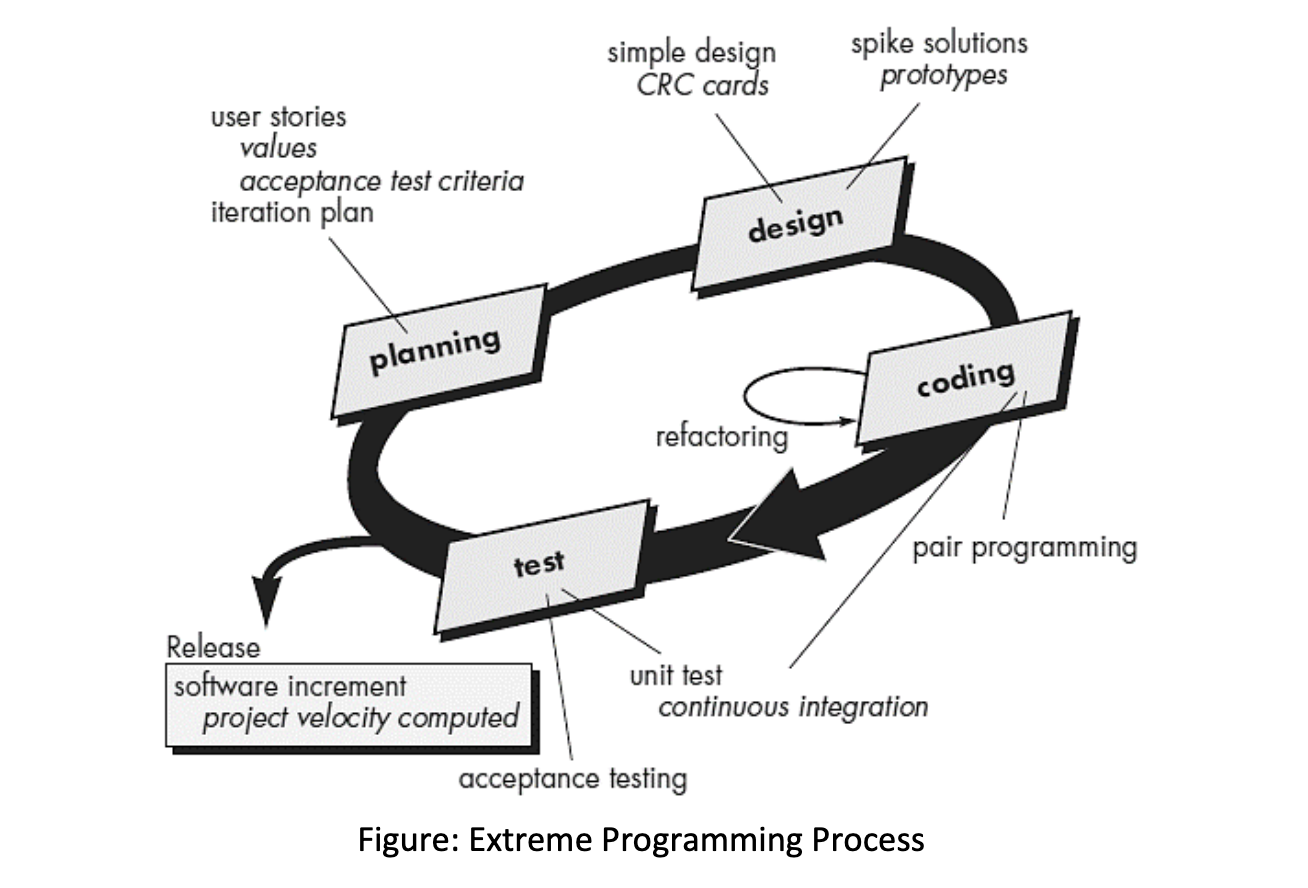 Extreme Programming (XP) is an agile software development methodology emphasizing frequent releases, collaboration, and flexibility. It's known for its iterative approach and customer involvement throughout the development process. Here are some advantages:
- Customer Satisfaction: XP promotes customer involvement, ensuring the delivered product meets their needs.
- Frequent Feedback: Iterative cycles enable continuous feedback, allowing for early detection of issues.
- Adaptability: XP embraces change, making it suitable for projects with evolving requirements.
- Quality Focus: Practices like pair programming and continuous testing aim to enhance code quality.
- Team Collaboration: Emphasis on teamwork fosters better communication and shared ownership.
- Risk Mitigation: Small, frequent releases reduce the risk of major failures and allow for quick adaptation.
What is Agility? List down 12 principals of Agile Manifesto.
Agility in software development refers to the ability to respond quickly and effectively to change while delivering value to customers. It emphasizes adaptability, collaboration, and iterative development.
The 12 principles of the Agile Manifesto are:
- Customer Satisfaction: Satisfying the customer through continuous software delivery is the highest priority.
- Embrace Changes: Welcome changing requirements, even late in development, to deliver working software.
- Deliver Frequently: Deliver working software frequently, with a preference for shorter timescales.
- Collaboration: Businesspeople and developers must work together daily throughout the project.
- Support Individuals: Build projects around motivated individuals. Give them the environment and support they need, and trust them to get the job done.
- Face-to-Face Communication: The most efficient and effective method of conveying information within a development team is face-to-face conversation.
- Working Software: Working software is the primary measure of progress.
- Sustainable Development: Agile processes promote sustainable development. The sponsors, developers, and users should maintain a constant pace indefinitely.
- Technical Excellence: Continuous attention to technical excellence and good design enhances agility.
- Simplicity: Simplicity—the art of maximizing the amount of work not done—is essential.
- Self-Organization: The best architectures, requirements, and designs emerge from self-organizing teams.
- Reflection and Adaptation: At regular intervals, the team reflects on how to become more effective, then tunes and adjusts its behavior accordingly.
Differentiate between classical waterfall model and iterative waterfall model.
| Classical Waterfall Model | Iterative Waterfall Model |
|---|---|
| Sequential, linear approach to software development | Iterative approach with cycles of development |
| Progresses through distinct phases: requirements, design, implementation, testing, deployment | Repeats development phases multiple times |
| Each phase is completed before moving to the next | Phases are revisited iteratively |
| Changes in requirements are not easily accommodated | Changes can be incorporated at each iteration |
| Suitable for projects with well-defined and stable requirements | Suited for projects with evolving or unclear requirements |
| Less flexible and adaptable to changes | Offers flexibility and allows for adapting to changes |
| Emphasizes documentation at each stage | Prioritizes working software over comprehensive documentation |
| High risk of late-stage issues or discrepancies | Early detection and correction of issues due to iterative nature |
| Minimal customer involvement until final delivery | Regular customer feedback and involvement |
| Deployment occurs only after the final phase | Incremental deployment of functional modules |
How does function requirements differ from non-functional requirements of the software?
| Functional Requirements | Non-Functional Requirements |
|---|---|
| Describes what the system should do | Describes how the system should be |
| Focuses on specific behaviors/functions | Concerns system attributes and qualities |
| Specific, measurable, and testable | Often subjective or qualitative |
| Defines system functionalities | Defines system characteristics |
| Examples: user authentication, search functionality, data manipulation | Examples: response time, system availability, security measures |
What is Software Engineering? List down different myths for it.
- Software Engineering refers to the systematic approach to developing, designing, maintaining, and managing software applications systematically. It encompasses various principles, methodologies, tools, and techniques to create high-quality software that meets user requirements.
-
It's Just Coding: People think it's all about writing code, but it's much more than that.
-
Anyone Can Do It: Not everyone can be a good software engineer; it takes skills and practice.
-
One-Size-Fits-All: There's no one "best" way to make software; it depends on the project.
-
Perfect Code Always: You don't need perfect code; it's about balancing time and quality.
-
Set and Forget: Software needs regular updates and care; it's not a one-time job.
-
No Need for Docs: Documentation is essential to understand and maintain software.
-
Late Bugs Are OK: Finding bugs late is costly; it's better to catch them early.
-
More Features = Better: Adding too many features can make software confusing.
-
Estimates Are Exact: Project estimates can be off; software is unpredictable.
-
No Testing Needed: Testing is crucial to ensure software works as intended.
Discuss some of the problems that occur when requirements must be elicited from three or four different customers.
- Eliciting requirements from multiple customers can introduce various challenges and complexities due to differing perspectives, needs, and priorities. Some problems that arise in such scenarios include:
-
Conflicting Requirements: Different customers may have conflicting needs or priorities, making it challenging to align requirements that satisfy all stakeholders.
-
Inconsistency: Requirements gathered from multiple sources might be inconsistent or contradictory, leading to confusion and ambiguity in defining a coherent system.
-
Prioritization Issues: Customers might have varying opinions on what features are essential, making it difficult to prioritize requirements and features for implementation.
-
Communication Barriers: Miscommunication or lack of clear communication among multiple customers can result in misunderstandings, leading to inaccurate or incomplete requirements.
-
Scope Creep: Diverse customer demands might lead to an expanding scope, making it challenging to manage project boundaries and control changes effectively.
-
Complex Decision-Making: Resolving conflicts or making decisions regarding conflicting requirements can become complex and time-consuming, potentially delaying the project.
-
Resource Constraints: Balancing the allocation of resources to accommodate multiple customer requirements can strain time, budget, and development efforts.
How do we assess the quality of a software design?
-
Adherence to Requirements: Check if the design aligns with specified functional and non-functional requirements.
-
Modularity & Cohesion: Evaluate how well the system is divided into manageable components, each performing distinct functions.
-
Coupling: Assess the interdependence between system components; aim for low coupling to reduce reliance and complexities.
-
Scalability: Determine if the design can accommodate future changes or expansions without requiring a complete overhaul.
-
Maintainability: Analyze how easily updates or modifications can be implemented without causing system-wide disruptions.
-
Readability & Standards: Ensure design documentation adheres to clear standards and is easy to understand for future reference.
-
Testability: Evaluate how effectively the design can be tested to ensure it meets specified requirements and functionalities.
Considering the aspects of the cost of software quality, which do you think is the most expensive and why?
The cost of fixing defects in software after it has been deployed to production is often the most expensive aspect of the cost of software quality. Here's why:
-
Post-Production Defects: Identifying and fixing defects after deployment can be significantly more expensive. It involves locating the issue, interrupting regular operations, and rectifying it swiftly to minimize negative impacts on users.
-
Impact on Users: Defects in live systems can lead to user dissatisfaction, loss of credibility, and sometimes financial losses due to service interruptions or incorrect functionalities.
-
Resource Intensive: Resolving issues post-deployment often requires a dedicated team, specialized resources, and urgent attention, leading to increased operational costs.
-
Higher Complexity: Fixing defects in a live system can be more complex due to the interdependencies of various components and the need to ensure minimal disruption to ongoing services.
-
Reputation Damage: The cost also extends to the damage inflicted on the organization's reputation, potentially resulting in a loss of customer trust and future business opportunities.
What elements of the WebApp can be “unit tested”? What types of tests must be conducted only after the WebApp elements are integrated?
In a web application, elements that can typically be "unit tested" individually include:
-
Functions and Methods: Testing individual functions or methods responsible for specific tasks within the application, like data processing or validation.
-
Components: Testing isolated parts of the UI, such as buttons, forms, or modules, to ensure they function correctly.
-
Backend Services: Testing API endpoints, services, or backend functions that handle data processing, database interactions, or business logic.
-
Frontend Logic: Testing JavaScript functions or scripts responsible for frontend interactions, like DOM manipulation or event handling.
Tests that are conducted only after integrating different elements of the web application include:
-
Integration Testing: Verifying that different components work together as expected when integrated, ensuring they communicate and function correctly as a whole system.
-
End-to-End Testing: Testing the entire flow of the application, simulating real user scenarios, interactions, and workflows.
-
User Interface Testing: Assessing the overall look, feel, and user experience of the integrated application, ensuring the UI components work harmoniously.
-
Performance Testing: Evaluating the application's response times, load capacities, and overall performance under varying conditions.
Using your own words, describe the difference between verification and validation. Do both make use of test-case design methods and testing strategies?
Both verification and validation aim to ensure software quality but focus on different aspects: verifying if the software is built correctly according to plans and standards (verification) and validating whether it meets user expectations and needs (validation). They employ various testing methods and strategies to achieve their respective objectives in software development.
-
Verification vs. Validation:
-
Verification: Checking if the software is developed correctly as per design and requirements.
- Ensures adherence to specifications and standards.
- Involves reviews and inspections to detect errors in plans and code.
-
Validation: Ensuring the software meets user needs and expectations.
- Confirms if the software satisfies its intended use in real-world scenarios.
- Involves actual testing against user requirements.
-
-
Test-Case Design Methods:
- Methods to create test cases for verification and validation:
- Equivalence partitioning, boundary value analysis, decision tables, etc.
- Used to design tests for verifying correctness and validating user needs.
- Methods to create test cases for verification and validation:
-
Testing Strategies:
- Strategies employed during verification and validation processes:
- Black-box testing, white-box testing, integration testing, system testing, acceptance testing, etc.
- Uncover defects and ensure the software meets specified requirements and user expectations.
- Strategies employed during verification and validation processes:
What is Requirement Engineering? How it is carried out in a Software Organizations?
Requirement Engineering involves gathering, analyzing, documenting, and managing requirements for a software system.
In software organizations, Requirement Engineering is conducted through several key steps:
-
Elicitation: Gathering requirements by interacting with stakeholders, users, and customers to comprehend their needs.
-
Analysis: Understanding and examining collected requirements to ensure they are consistent, complete, and feasible.
-
Specification: Documenting requirements in a clear and understandable manner, often using formats like use cases, user stories, or requirement documents.
-
Validation: Verifying if the specified requirements align with stakeholders' expectations and can be met practically.
-
Management: Handling changes, ensuring traceability, and managing the entire requirements process throughout the software development lifecycle.
-
Communication: Facilitating effective communication among stakeholders to ensure a shared understanding of requirements.
What is Software Quality? List down different Software Quality Metrics?
Software Quality refers to the degree to which software meets specified requirements and satisfies the needs or expectations of its users. It involves various attributes like functionality, reliability, usability, efficiency, maintainability, and security.
Here are different Software Quality Metrics:
-
Defect Density: The number of defects per lines of code or function points.
-
Code Coverage: Measures the percentage of code covered by automated tests.
-
Reliability: Reflects the probability of failure-free software operation for a specified period under specified conditions.
-
Response Time: Measures the time taken by the system to respond to user actions.
-
Maintainability: Assesses how easily software can be modified to correct defects, adapt to changes, or meet new requirements.
-
Security Vulnerabilities: Identifies the number and severity of security issues or vulnerabilities present in the software.
-
Usability: Measures how easily users can interact with the software to perform intended tasks.
-
Efficiency: Indicates the system's ability to use resources effectively and perform tasks within optimal time and resource limits.
-
Scalability: Measures the software's ability to handle increased workload or users without significant performance degradation.
-
Test Coverage: Evaluates the percentage of requirements covered by test cases.
What is Software Maintenance? Explain different types of it in short.
Software maintenance involves modifying, updating, and managing software to ensure it remains effective and usable. The different types of software maintenance are:
-
Corrective Maintenance: Focuses on fixing errors, faults, or bugs identified after the software is deployed.
-
Adaptive Maintenance: Involves modifying the software to keep it usable in a changing environment, such as adapting to new hardware or operating systems.
-
Perfective Maintenance: Aims to improve the software's performance or add new features based on user requirements, enhancing its functionality.
-
Preventive Maintenance: Proactive measures to prevent potential future issues by identifying and fixing problems before they occur, often through code optimization or updates.
Define: Risk Identification, Risk Refinement, and Risk Mitigation.
-
Risk Identification:
- Definition: Finding and listing possible problems that could affect a project.
- Procedure: Look for things that might go wrong and list them down.
- Outcome: You get a list of potential issues that could cause trouble.
-
Risk Refinement:
- Definition: Sorting and focusing on the most important risks.
- Procedure: Decide which issues are the most serious and need attention.
- Outcome: Helps to concentrate on the most critical problems.
-
Risk Mitigation:
- Definition: Making plans to reduce the impact of identified risks.
- Procedure: Develop strategies to deal with potential issues.
- Outcome: Aims to minimize the impact of problems if they occur.
What is Component Based Software Engineering? What are its advantages?
Component-Based Software Engineering (CBSE) is an approach that focuses on constructing software systems by integrating pre-built, reusable components. These components are independent, self-contained units that encapsulate specific functionalities or services. The approach emphasizes assembling systems from existing components rather than creating everything from scratch.
Advantages of Component-Based Software Engineering:
-
Reusability: Components can be reused across various projects, saving time and effort in development.
-
Reliability: Reusable components have undergone testing and are proven to work reliably, reducing the risk of errors.
-
Productivity: Developers can focus on integrating and customizing components rather than building them from scratch, accelerating development cycles.
-
Maintenance Ease: As components are independent, updating or modifying one component does not affect others, simplifying maintenance.
-
Cost-Efficiency: Reusing existing components reduces development costs, especially when compared to creating custom solutions for every project.
-
Scalability: Components can be easily replaced or updated to meet changing project requirements or technological advancements.
-
Consistency: By using established components, consistency in design and behavior across applications can be ensured.
-
Faster Time-to-Market: Leveraging existing components allows quicker assembly and deployment of software solutions.
How does the behavior testing method work?
Behavior testing is a method to verify if the software behaves as expected when users interact with it. It validates the system's responses to different inputs and scenarios, checking its behavior against the specified requirements. Here's how it generally works:
-
Test Scenarios Creation: Define scenarios that cover various user interactions and system responses based on requirements.
-
Test Case Design: Develop test cases to execute these scenarios. Each case includes inputs, actions, and expected outcomes.
-
Testing Execution: Perform the test cases by providing inputs and examining the system's behavior in response to those inputs.
-
Observation and Comparison: Observe the actual outputs or behavior and compare them with expected outcomes specified in the test cases.
-
Reporting and Analysis: Document discrepancies between expected and actual behavior. Report any deviations as defects or issues to be addressed.
-
Iteration and Improvement: Repeatedly execute tests, modifying or adding new scenarios to ensure comprehensive coverage. Improve the test suite based on the discovered issues.
Why low coupling and high cohesion is one of the desired properties of software design?
Low coupling and high cohesion in software design are essential because they:
- Simplify Complexity: Reducing interdependencies between components makes the system less complex.
- Ease Maintenance: With low coupling, modifications in one module won't extensively affect others, making maintenance simpler.
- Boost Reusability: Loosely connected components are more adaptable and reusable across various projects or contexts.
- Clarify Component Tasks: High cohesion ensures each part focuses on a specific task, improving clarity and understanding.
- Facilitate Testing: Components with low coupling are easier to test independently, ensuring better quality control.
- Allow Flexibility: They offer a flexible architecture, enabling smoother adjustments or additions to the system.
- Support Scalability: Systems with these qualities can grow or change without disrupting the entire structure, enhancing scalability.
How does one design a good user interface for the software?
Designing a good user interface involves several key aspects:
- User Understanding: Grasp user needs and tasks.
- Simplicity and Clarity: Keep it intuitive.
- Consistent Design: Maintain uniform elements.
- Effective Navigation: Create an easy structure.
- Visual Emphasis: Highlight crucial elements.
- Accessibility for All: Ensure usability for everyone.
- Feedback and Error Handling: Provide clear responses.
- Responsive Design: Suitability across devices.
- Prototype and Testing: Gather feedback early.
- Continuous Improvement: Iteratively enhance based on feedback.
What are the benefits of software reengineering?
-
Modernization: Updates outdated systems to leverage modern technologies, making them more compatible and efficient.
-
Enhanced Performance: Improves system performance by refining code, optimizing processes, and updating components.
-
Cost-Effectiveness: Rather than rebuilding from scratch, reengineering can be a more cost-efficient method to improve existing systems.
-
Maintainability: Increases the system's maintainability by restructuring and enhancing the codebase for easier future modifications.
-
Functionality Improvement: Adds new functionalities or refines existing ones to meet current business needs and user expectations.
-
Risk Mitigation: Reduces risks associated with older systems, such as security vulnerabilities or compatibility issues.
-
Knowledge Preservation: Retains valuable business knowledge embedded within the legacy system by modernizing it for future use.
-
Streamlined Processes: Helps in streamlining complex or convoluted processes, making the software more efficient and user-friendly.
-
Adaptation: Enables the software to adapt to changing market trends, customer requirements, and technological advancements.
-
Compliance and Standards: Ensures compliance with updated industry standards, regulations, and security protocols.
Explain domain analysis process in component Based Software Engineering? (R/ChatGPT)
Domain analysis in Component-Based Software Engineering (CBSE) involves analyzing a specific application domain to identify and develop reusable components. Here's the process:
-
Domain Understanding:
- Understanding the application domain involves comprehending the commonalities, variations, and requirements across different applications in that domain.
-
Domain Modeling:
- Creating a domain model to represent essential concepts, relationships, and functionalities within the domain. It helps in identifying commonalities and variabilities across different applications.
-
Identifying Components:
- Analyzing the domain to identify potential reusable components that can be generalized and used across various applications within the domain.
-
Component Specification:
- Specifying the identified components in detail, including their interfaces, functionalities, and interactions with other components.
-
Component Development:
- Building and implementing the reusable components based on the specifications developed during the domain analysis phase.
-
Testing and Validation:
- Verifying and validating the developed components to ensure they meet the required standards and functionalities.
-
Documentation and Maintenance:
- Documenting the components, their functionalities, and usage guidelines for future reference. Also, maintaining these components for future reusability and enhancements.
Domain analysis in CBSE aims to create a set of reusable components that can be leveraged across multiple applications within a specific domain, reducing development time and improving the quality of software systems.
What is DevOps? List down its toolchain for development process. (R/ChatGPT)
DevOps is a software development approach that combines software development (Dev) and IT operations (Ops) to streamline the software delivery process and improve collaboration between teams. Here's a simplified explanation along with some tools used in the DevOps toolchain:
DevOps:
DevOps is an approach that emphasizes collaboration, automation, and integration between software development and IT operations teams to speed up the software delivery process, increase deployment frequency, and ensure a more reliable software release cycle.
DevOps Toolchain Components:
-
Version Control System (VCS): Git, SVN
-
Continuous Integration (CI): Jenkins, Travis CI, GitLab CI
-
Continuous Deployment/Continuous Delivery (CD): Kubernetes, Docker, Ansible
-
Configuration Management: Chef, Puppet, Ansible
-
Containerization: Docker
-
Monitoring and Logging: Prometheus, ELK Stack (Elasticsearch, Logstash, Kibana)
-
Collaboration and Communication: Slack, Microsoft Teams, Jira
Four Marks
Define the terms: 1) Agility 2) Agile team
Agility:
-
Agility in software development refers to the ability of a team or organization to respond promptly and effectively to changing requirements, priorities, or market conditions. It involves maintaining flexibility and adaptability throughout the development process.
-
It encourages team structures and attitudes that make communication (among team members, between technologists and business people, between software engineers and their managers) more simplistic.
Agile Team:
-
An Agile team is a cross-functional group of individuals working collaboratively to deliver software in an Agile development environment. These teams are characterized by close communication, adaptability, and a commitment to delivering incremental value.
-
Cross-Functional Collaboration: Agile teams consist of members with diverse skills, such as developers, testers, designers, and business analysts, promoting collaboration and ensuring that all necessary expertise is present within the team.
What are the types of metrics?
In software engineering, metrics are measurements that provide quantitative information about various aspects of the software development process. Here are the primary types of metrics in software engineering:
Types of Software Metrics:
-
Product Metrics:
- Focus: Assess the quality and characteristics of the software product itself.
- Examples: Defect Density, Reliability, Maintainability.
-
Process Metrics:
- Focus: Evaluate the effectiveness and efficiency of the development process.
- Examples: Cyclomatic Complexity, Code Churn, Lead Time.
-
Project Metrics:
- Focus: Provide insights into project management aspects and performance.
- Examples: Cost Performance Index (CPI), Schedule Performance Index (SPI), Effort Variance.
-
Size-Oriented Metrics:
- Focus: Measure the size or volume of the software.
- Examples: Lines of Code (LOC), Kilo Source Lines of Code (KSLOC), Function Points.
-
Function-Oriented Metrics:
- Focus: Assess the functionality and features provided by the software.
- Examples: Function Points, Feature Points, Use Case Points.
-
Object-Oriented Metrics:
- Focus: Quantify aspects related to the object-oriented design and implementation.
- Examples: Number of Classes, Depth of Inheritance Tree, Coupling Between Objects.
-
Use-Case–Oriented Metrics:
- Focus: Evaluate the functionality and interactions based on use cases.
- Examples: Use Case Points, Use Case Size, Actor Points.
-
Function Point Metrics:
- Focus: Measure the functionality provided to the user based on user inputs and outputs.
- Examples: Unadjusted Function Points, Adjusted Function Points.
Differentiate between verification and validation. (summer-4)
Distinguish between verification & validation.
| Aspect | Verification | Validation |
|---|---|---|
| 1. Definition | Static practice of verifying documents, design, code, and program. | Dynamic mechanism of validating and testing the actual product. |
| 2. Code Execution | Does not involve executing the code. | Always involves executing the code. |
| 3. Checking Type | Human-based checking of documents and files. | Computer-based execution of the program. |
| 4. Methods | Uses methods like inspections, reviews, walkthroughs, and desk-checking. | Uses methods like black box (functional) testing, gray box testing, and white box (structural) testing. |
| 5. Purpose | To check whether the software conforms to specifications. | To check whether software meets customer expectations and requirements. |
| 6. Error Detection | Can catch errors that validation cannot catch; a low-level exercise. | Can catch errors that verification cannot catch; a high-level exercise. |
| 7. Target | Requirements specification, application and software architecture, high-level, complete design, and database design, etc. | Actual product - a unit, a module, a set of integrated modules, and effective final product. |
| 8. Team Involvement | Done by QA team to ensure that the software is as per the specifications in the SRS document. | Carried out with the involvement of the testing team. |
| 9. Sequence | Generally comes first - done before validation. | Generally follows after verification. |
Compare Spiral Model with Prototype model.
| Aspect | Spiral Model | Prototype Model |
|---|---|---|
| Development Approach | Iterative with added features in each cycle. | Iterative, focuses on creating and refining a prototype. |
| Phases | Planning, risk analysis, engineering, and evaluation in each iteration. | Prototype creation, feedback, and refinement. |
| Risk Management | Emphasizes ongoing risk assessment and management. | Adapts risk management based on prototype feedback. |
| Feedback | Gathers feedback to refine the software at each iteration. | Crucial for refining the prototype based on user input. |
| Suitability | For large projects with evolving requirements and risk management needs. | Ideal for projects with unclear requirements, using a prototype to understand and refine needs. |
| Flexibility | Offers flexibility for changes during development. | Allows modifications based on user feedback during prototype iterations. |
| User Involvement | Requires ongoing user involvement for feedback. | High user involvement during prototype creation and evaluation. |
| Example Usage | In projects with evolving requirements and critical risk management needs. | When user requirements are unclear, and a prototype aids in understanding and refining needs. |
| Costs and Time | Potentially higher costs due to comprehensive iterative process. | May lead to reduced overall development costs by identifying issues early in the process. |
Explain merits and demerits of Scrum.
Merits of SCRUM:
- Scrum ensures effective use of time and money
- Large projects are divided into easily manageable sprints
- Developments are coded and tested during the sprint review
- Works well for fast-moving development projects
- The team gets clear visibility through scrum meetings
- Scrum, being agile, adopts feedback from customers and stakeholders
- Short sprints enable changes based on feedback a lot more easily
- The individual effort of each team member is visible during daily scrum meetings
Demerits of SCRUM:
- Scrum often leads to scope creep, due to the lack of a definite end-date
- The chances of project failure are high if individuals aren't very committed or cooperative
- Adopting the Scrum framework in large teams is challenging
- The framework can be successful only with experienced team members
- Daily meetings sometimes frustrate team members
- If any team member leaves in the middle of a project, it can have a huge negative impact on the project
- Quality is hard to implement, until the team goes through aggressive testing process
Distinguish between process and methods.
| Aspect | Process | Methods |
|---|---|---|
| Definition | Broader framework for organizing work. | Specific techniques or procedures for a task. |
| Nature | General approach to achieve defined outcomes. | Detailed actions within a particular activity. |
| Scope | Encompasses the entire sequence of activities. | Focuses on execution details within the process. |
| Examples | SDLC (Software development life cycle), project management processes. | Object-oriented design, test-driven development. |
| Flexibility | Offers a structured framework for adaptation. | May have less flexibility, providing specific steps. |
| Detail | Higher level of abstraction. | Lower level of abstraction, specific task details. |
| Applicability | Across various projects or domains. | Specific to tasks or activities within a project. |
| Goal | Defines overall approach to objectives. | Specifies means to achieve a specific aspect of a goal. |
| Change Impact | Changes may significantly impact workflow. | Changes affect specific tasks or activities. |
What is Extreme Programming?
Extreme Programming (XP):
- The most widely used approach to agile software development.
- A variant of XP called Industrial XP (IXP) has been proposed to target process for large organizations.
- It uses object oriented approach as its preferred development model.
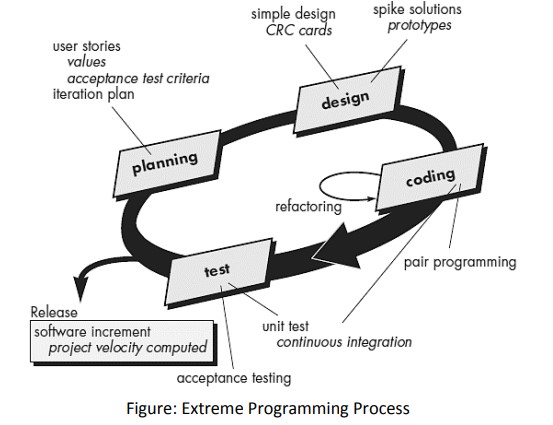
- Planning:
- User Stories: Created and prioritized by the customer.
- Assessment: Agile team assesses, assigns cost, and groups stories.
- Delivery Commitment: A commitment is made for deliverable increments.
- Project Velocity: Used to define subsequent delivery dates.
- Design:
- Keep It Simple: Encourages simplicity in design.
- CRC Cards: Supports class-responsibility-collaborator cards.
- Spike Solutions: Prototype for challenging design problems.
- Refactoring: Iterative refinement of internal design before and after coding.
- Coding:
- Unit Tests: Constructed for each story before coding.
- Pair Programming: Developers work in pairs for real-time problem solving and quality assurance.
- Continuous Integration: Provides a "smoke testing" environment.
- Testing:
- Automated Unit Tests: Implemented using a framework for regression testing.
- Daily Integration Testing: Integration and validation testing on a daily basis.
- Acceptance Tests: Specified by the customer and executed to assess customer-visible functionality, derived from user stories.
What are the common activities in design process?
In the design process of software development, several common activities are crucial to creating an effective and functional system:
- Requirement Analysis:
- Understanding and documenting user needs, functionalities, constraints, and system specifications.
- System Architecture Design:
- Creating the high-level structure and components of the system, defining how different modules interact and organizing the system's layout.
- Detailed Design:
- Translating the architectural design into more detailed specifications, including data structures, algorithms, interfaces, and design patterns.
- User Interface (UI) Design:
- Developing the visual and interactive elements of the system, focusing on user experience, ease of use, and aesthetics.
- Database Design:
- Designing the structure and organization of the database, including tables, relationships, indexing, and storage requirements.
- Component Design:
- Creating individual components or modules with well-defined interfaces, functionalities, and interaction with other system parts.
- Security Design:
- Incorporating security measures and protocols to safeguard the system against potential threats, ensuring data confidentiality, integrity, and availability.
- Performance Design:
- Optimizing the system's performance by considering factors like response time, resource utilization, and scalability.
- Testing Strategy Design:
- Planning and defining strategies for various testing phases to validate the system's functionality, reliability, and performance.
- Documentation:
- Creating comprehensive documentation that includes design specifications, architecture diagrams, user manuals, and guidelines for future maintenance and development.
What are the various elements of data design?
Certainly! Data design encompasses architectural and component-level considerations. Here are the key elements:
Data Design at the Architectural Level:
-
Data Mining Techniques: These techniques, also known as Knowledge Discovery in Databases (KDD), extract valuable insights and information from existing databases, especially when the desired information spans multiple functions.
-
Data Warehouse: An alternative solution that adds an additional layer to the data architecture. It's a separate environment housing all business-related data, not directly integrated with day-to-day applications.
Data Design at the Component Level:
-
Refining Data Objects: Focusing on specific data structures required to realize manipulated data objects within a component.
-
Implementing Data Object Attributes: Mapping data object attributes to appropriate data structures.
-
Reviewing Data Structures: Ensuring the establishment of proper relationships among data structures.
Principles for Data Specification:
- Systematic Analysis: Apply systematic analysis principles to both function/behavior and data.
- Identification of Data Structures: Identify all data structures and operations to be performed on each.
- Data Dictionary: Establish and use a data dictionary for defining both data and program design.
- Deferred Decisions: Defer low-level data design decisions until later stages of the design process.
- Access Control: Limit knowledge of data structure representation to modules requiring direct data use.
- Library Development: Create a library of useful data structures and their associated operations.
- Language Support: Utilize a software design language that supports the specification and realization of abstract data types.
What is DevOps?
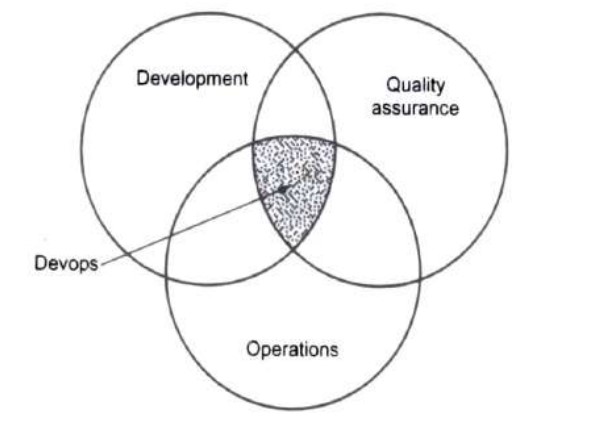
- Devops is a practice in which development and operation engineers participate together in entire lifecycle activities of system development from design, implementation to product support.
-
The term Devops is derived from "Software DEVelopment " and "information technology OPerationS.
-
Devops promotes a set of processes and methods from the three department Development, IT operations and Quality assurance that communicate and collaborate together for development of software system.
What is DevOps? Explain the importance and benefits of the DevOps.
Benefits of DevOps
- Faster, better product delivery
- Faster issue resolution and reduced complexity
- Greater scalability and availability
- More stable operating environments
- Better resource utilization
- Greater automation
- Greater visibility into system outcomes
- Greater innovation
Importance of DevOps
- Shorter development cycles that encourage innovation
- More collaboration, better communication
- Reduced deployment failures and faster time to recover
- Efficiency: Improved resource management
Define Coupling and Cohesion. What is the difference between cohesion and coupling?
Coupling:
- Coupling refers to the degree of interdependence between modules or components in a software system. It measures how closely connected two components are to each other.
- A Coupling is an indication of the relative interdependence among modules.
Cohesion:
- Cohesion is the degree to which the elements within a module or component work together to achieve a common purpose. It measures how closely the internal elements of a module are related.
- A cohesive module performs a single task, requiring little interaction with other components.
Difference between Cohesion and Coupling:
| Aspect | Cohesion | Coupling |
|---|---|---|
| Definition | Degree of internal unity within a module. | Degree of interdependence between modules. |
| Focus | Internal to a module or component. | Concerns relationships between modules. |
| Goal | Achieve a common purpose within a module. | Minimize dependency between different modules. |
| Types | Examples: Functional, Sequential, Temporal. | Examples: Loose coupling, Tight coupling. |
| Impact on Maintenance | Higher cohesion eases maintenance. | Lower coupling simplifies maintenance. |
| Design Principle | Encourages a well-organized module structure. | Encourages modularization and independence. |
What are the fundamental differences between DevOps & Agile Development?
| Aspect | DevOps | Agile Development |
|---|---|---|
| Focus | Collaboration between development and operations. | Iterative and incremental development of software. |
| Objective | Streamlining software development and operations. | Delivering functional software in short iterations. |
| Lifecycle Emphasis | End-to-end software development lifecycle. | Primarily on the development phase of the lifecycle. |
| Deployment | Emphasizes continuous delivery and deployment. | Delivers working software in short, fixed cycles. |
| Teams Collaboration | Close collaboration between Dev and Ops teams. | Collaboration within cross-functional development teams. |
| Automation | Extensive automation for development and operations tasks. | Automation is common, but not as extensive as in DevOps. |
| Role of Operations | Operations is an integral part of the development process. | Operations is a separate function from development. |
| Customer Engagement | Directly impacts end-users with rapid and continuous changes. | Customer feedback is collected at the end of each iteration. |
| Change Management | Embraces rapid and frequent changes. | Adaptable to changes, but through planned iterations. |
| Scale | Suitable for large and complex systems. | Generally used for smaller to medium-sized projects. |
Explain RMMM plan.
- The RMMM plan stands for Risk Mitigation, Monitoring, and Management plan. It's a structured approach that outlines strategies for handling risks within a project.
- Documents all risk analysis work within the project.
- Utilized by the project manager as part of the overall project plan.
- Risk Mitigation:
- Develop strategies and actions to mitigate or reduce the impact of identified risks. This involves proactive measures to prevent risks from occurring or to minimize their consequences.
- Assign responsibilities for implementing mitigation strategies and establish contingency plans for potential risk scenarios.
- Risk Monitoring:
- Define a monitoring process to track and assess the status of identified risks throughout the project lifecycle.
- Establish key performance indicators (KPIs) and triggers that indicate when a risk is escalating or when mitigation measures need to be implemented.
- Risk Management Activities:
- Detail the specific activities and tasks associated with managing and mitigating risks. This includes regular risk reviews, status reporting, and updates to the risk register.
- Specify how risk information will be communicated to stakeholders and team members.
What are the elements of Analysis model?
The analysis model in software engineering encompasses various elements essential for understanding and defining system requirements. Some key components include:
-
Use Cases: Descriptions of system interactions from the perspective of an actor (user or system).
-
Activity Diagrams: Illustrate workflow or process flows, demonstrating sequences of activities or actions within the system.
-
Data Flow Diagrams (DFDs): Visualize data flow within the system, showing how data moves between processes, stores, and external entities.
-
Entity-Relationship Diagrams (ERDs): Depict relationships between entities in a system and how they interact with each other.
-
Class Diagrams: Represent system structure by illustrating classes, their attributes, and relationships between classes.
-
State Diagrams: Showcase system behavior by presenting various states a system can transition through based on events or actions.
-
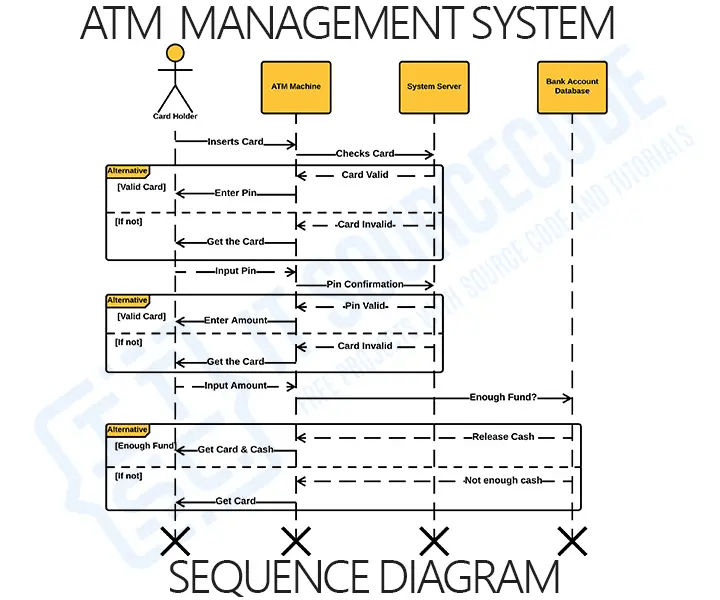
Sequence Diagrams: Show interactions between different system components or objects in a sequential manner.
Define design process. List the principles of a software design.
- The design process refers to the systematic and structured approach followed by designers to create solutions, products, or systems. It involves a series of steps that typically include problem definition, research, ideation, prototyping, testing, refinement, and implementation. The design process is iterative, allowing for continuous improvement and adjustment based on feedback and insights gained during various stages.
Principles of Software Design:
- The design process should not suffer from "tunnel vision."
- The design should be traceable to the analysis model.
- The design should not reinvent the wheel.
- The design should "minimize the intellectual distance" between the software and the problem as it exists in the real world.
- The design should exhibit uniformity and integration.
- The design should be structured to accommodate change.
- The design should be structured to degrade gently, even when abnormal data, events, or operating conditions are encountered.
- Design is not coding, coding is not design.
- The design should be assessed for quality as it is being created, not after the fact.
- The design should be reviewed to minimize conceptual (semantic)
Briefly discuss the process of reverse software engineering. (summer-4)
Write short note on Reverse-engineering. (3)
Explain reverse engineering.
- Software Reverse Engineering is a process of recovering the design, requirement specifications, and functions of a product from an analysis of its code. It builds a program database and generates information from this.
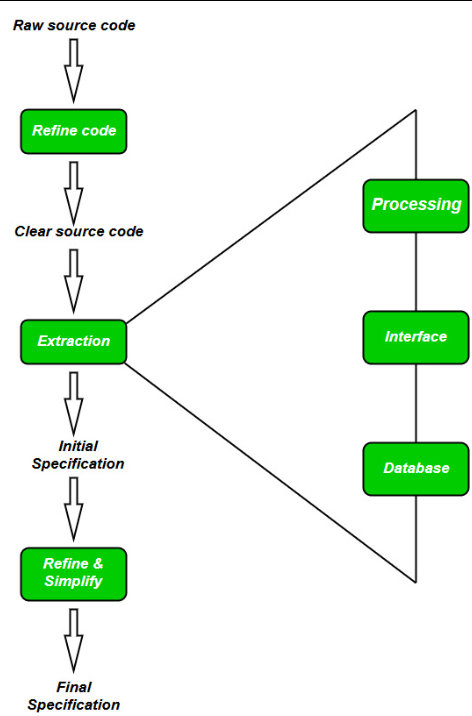
- Collection Information:
- Gather all available information about the software (e.g., source code, design documents).
- Examining the Information:
- Study the collected information to become familiar with the system.
- Extracting the Structure:
- Identify the program structure, represented as a structure chart where each node corresponds to a routine.
- Recording the Functionality:
- Record processing details of each module using a structured language like decision tables.
- Recording Data Flow:
- Derive data flow diagrams from extracted information to illustrate the flow of data among processes.
- Recording Control Flow:
- Document the high-level control structure of the software.
- Review Extracted Design:
- Conduct multiple reviews to ensure consistency and correctness of the extracted design.
- Generate Documentation:
- Create comprehensive documentation, including Software Requirements Specification (SRS), design documents, history, and an overview for future reference.
Describe the different challenges with DevOps implementation.
What are the challenges with DevOps implementation?
- Cultural Resistance:
- Resistance to cultural change within teams and organizations.
- Skillset Gaps:
- Lack of expertise in DevOps practices and tools.
- Legacy Systems:
- Integration with legacy systems that are not designed for continuous delivery.
- Security Concerns:
- Addressing security issues throughout the DevOps lifecycle.
- Continuous Testing:
- Establishing and maintaining effective automated testing practices.
- Scalability Issues:
- Scaling DevOps practices for large enterprises or complex systems.
- Measuring Success:
- Defining and measuring key performance indicators (KPIs) for DevOps success.
- DevOps in Legacy Environments:
- Implementing DevOps in environments with traditional structures and processes.
- Continuous Monitoring:
- Establishing effective monitoring practices for applications in production.
- DevOps Culture Education:
- Lack of awareness and understanding of DevOps principles.
- Continuous Improvement:
- Fostering a culture of continuous improvement.
Explain Software metrics used for software cost estimation.
-
A metrics is a measurement of the level that any impute belongs to a system product or process.
-
There are 4 functions related to software metrics:
-
Planning
-
Organizing
-
Controlling
-
Improving
-
Characteristics of software Metrics:
-
Quantitative: Metrics must possess quantitative nature. It means metrics can be expressed in values.
-
Understandable: Metric computation should be easily understood ,the method of computing metric should be clearly defined.
-
Applicability: Metrics should be applicable in the initial phases of development of the software.
-
Repeatable: The metric values should be same when measured repeatedly and consistent in nature.
-
Economical: Computation of metric should be economical.
-
Language Independent: Metrics should not depend on any programming language.
There are 3 types of software metrics:
- Product Metrics:
- Product metrics are used to evaluate the state of the product, tracing risks and undercovering prospective problem areas. The ability of team to control quality is evaluated.
- Process Metrics:
- Process metrics pay particular attention on enhancing the long term process of the team or organization.
- Project Metrics:
-
Project matrix is describes the project characteristic and execution process.
- Number of software developer
- Staffing pattern over the life cycle of software
- Cost and schedule
- Productivity
What is process model? Compare incremental process model with prototyping process model.
- Software Processes is a coherent set of activities for specifying, designing, implementing and testing software systems.
- A software process model is an abstract representation of a process that presents a description of a process from some particular perspective.
| Aspect | Incremental Process Model | Prototyping Process Model |
|---|---|---|
| Overview | Builds the system incrementally. | Builds a partial system quickly and refines it iteratively. |
| Development Phases | Divides the project into small parts. | Emphasizes creating a prototype, refining based on user feedback. |
| Feedback | Gathers feedback after each increment. | Involves continuous feedback loops with users. |
| User Involvement | Involves users throughout the process. | Users actively engage in refining the prototype. |
| Risk Management | Identifies and manages risks incrementally. | Addresses risks through iterative prototyping. |
| Flexibility | Provides flexibility for changes during development. | Offers flexibility for refining and modifying the prototype. |
| Final Product Development | Integrates all increments in later stages. | The prototype evolves into the final product. |
| Suitability | Suitable for projects with evolving requirements. | Suitable for projects with unclear or changing requirements. |
What is black box testing? What are the different black box testing techniques?
Black box testing is a software testing method where the internal workings of the software are not known to the tester. The focus is on validating the functionality of the software by testing inputs and checking outputs without knowledge of the underlying code or system structure.
-
Equivalence Partitioning:
- Divides input domain into classes.
- Ensures testing within each class for consistent behavior.
-
Boundary Value Analysis:
- Tests values at input boundaries.
- Ensures system behavior at minimum, maximum, and boundary values.
-
Decision Table Testing:
- Captures input-output combinations based on rules.
- Ensures comprehensive coverage of input scenarios.
-
State Transition Testing:
- Tests transitions between distinct system states.
- Verifies correct behavior in each state.
-
Use Case Testing:
- Tests system based on specified use cases.
- Ensures alignment with documented requirements.
Explain software engineering as a layered technology. (3 mark)
What are different layers of Software Engineering? Draw and explain it in short.
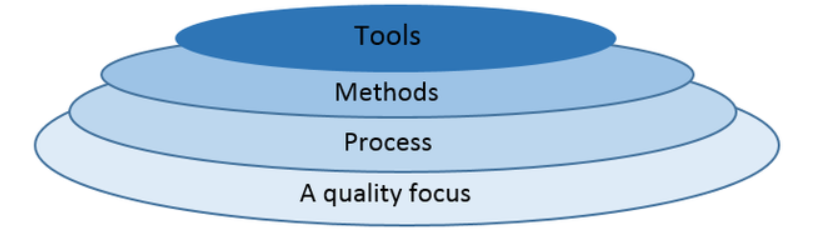
-
Quality Focus:
- Emphasizes quality as the primary principle.
- Adopts Total Quality Management (TQM), Six Sigma, ISO standards, and Capability Maturity Model (CMM) for continuous improvement.
-
Process:
- Forms the foundation of Software Engineering.
- Acts as the framework guiding effective software delivery.
-
Methods:
- Provides technical guidance for software development.
- Encompasses tasks like communication, requirement analysis, design modeling, programming, testing, and support.
-
Tools:
- Utilizes Software Engineering Tools (e.g., CASE tools) for automation.
- Computer-Aided Software Engineering (CASE) ensures systematic and high-quality software development.
Draw and explain different phases of Agile Process Model.
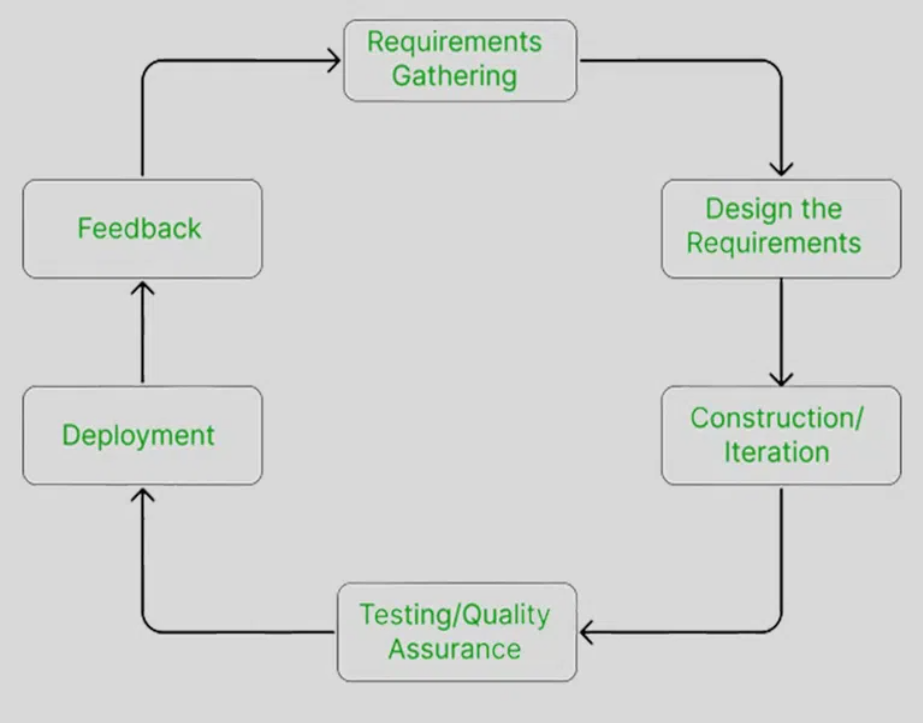
- Requirement Gathering:
- Interact with the customer to gather project requirements.
- Evaluate technical and economic feasibility.
- Plan time and effort for project development.
- Design the Requirements:
- Use user-flow diagrams and high-level UML diagrams.
- Wireframe and design user interfaces.
- Construction / Iteration:
- Development team starts building the project.
- Aim to deploy a working product.
- Testing / Quality Assurance:
- Includes Unit Testing, Integration Testing, and System Testing.
- Unit Testing checks individual code units.
- Integration Testing identifies issues in combined software units.
- System Testing ensures the software meets user requirements.
- Deployment:
- Deploy the working project to end-users.
- Feedback:
- Gather feedback from users.
- Address and correct bugs based on customer feedback.
Distinguish between a program and a software product. (3 mark)
Difference between Product and Process in the context of software engineering. contect of software engineering
| Aspect | Product | Process |
|---|---|---|
| 1. Definition | The final production of the project. | A set of sequence steps that have to be followed to create a project. |
| 2. Focus | Focuses on the final result. | Focused on completing each step being developed. |
| 3. Guidelines | Firm guidelines are followed during development. | Consistently follows guidelines. |
| 4. Duration | Tends to be short-term. | Tends to be long-term. |
| 5. Goal | The main goal is to complete the work successfully. | The purpose is to make the quality of the project better. |
| 6. Customer Needs | Created based on the needs and expectations of customers. | Serves as a model for producing various goods in a similar way. |
| 7. Layout | A product layout places materials in a single line based on operations order. | Process layout groups resources with similar processes or functions. |
| 8. Patents | Product patents offer a greater level of protection. | Process patents provide the inventor only limited protection. |
What are the different risk identification methods? Explain any one of them in brief.
Risk identification is a crucial step in risk management, and various methods can be used to identify risks in a project. Here are some common risk identification methods:
- Brainstorming
- Checklists
- Interviews
- SWOT Analysis
- Documentation Reviews
- Expert Judgment
- Delphi Technique
- Cause and Effect Diagrams (Fishbone Diagrams)
- Scenario Analysis
- Risk Histories
Brainstorming:
- Description: Brainstorming is a creative group technique where team members gather to generate a large number of ideas quickly. It encourages free thinking and open discussion to identify potential risks.
- Process: Team members express their thoughts, ideas, or concerns related to potential risks without criticism. All ideas are collected without immediate evaluation.
- Benefits: It promotes a collaborative and inclusive environment, allowing diverse perspectives. It encourages out-of-the-box thinking and helps in uncovering risks that might not be apparent initially.
- Limitations: It may face challenges if there's a dominant voice in the group or if some team members are hesitant to share their thoughts. It's essential to create a non-judgmental atmosphere.
You have been appointed a project manager for a major software products company. Your job is to manage the development of the next-generation version of its widely used word processing software. Because competition is intense, tight deadlines have been established and announced. What team structure would you choose and why? What software process model(s) would you choose and why?
Team Structure: For the development of the next-generation version of a widely used word processing software with tight deadlines, a suitable team structure would be the Agile Team Structure.
- Agile Team Structure:
- Cross-Functional Teams: Form cross-functional teams comprising members with diverse skills such as software development, UI/UX design, testing, and documentation.
- Collaboration: Foster close collaboration and communication within the team, enabling quick decision-making and adaptability.
- Customer-Centric: Align teams with customer needs, emphasizing customer feedback and continuous improvement.
Reasoning:
- Agile teams are known for their flexibility, adaptability, and responsiveness to changing requirements. This is crucial in a competitive environment with tight deadlines, allowing the team to quickly adjust to customer feedback and market changes.
Software Process Model:
-
Considering the need for quick iterations, customer feedback, and adaptability, the Scrum Agile Model would be a suitable choice.
-
Scrum Agile Model:
- Iterative Development: The Scrum model is iterative, with short development cycles known as sprints.
- Frequent Releases: Sprints end with potentially shippable increments, allowing for frequent releases and updates.
- Customer Feedback: Regular sprint reviews involve customer feedback, ensuring alignment with user expectations.
- Adaptability: Scrum allows for changes in requirements even late in the development process.
Reasoning:
- Scrum's iterative nature and focus on customer feedback align well with the need for quick releases and adaptability. It enables the team to prioritize features based on customer value and deliver incremental updates, meeting tight deadlines effectively.
You have been appointed a software project manager for a company that services the genetic engineering world. Your job is to manage the development of a new software product that will accelerate the pace of gene typing. The work is R&D oriented, but the goal is to produce a product within the next year. What team structure would you choose and why? What software process model(s) would you choose and why?
Team Structure:
For the development of a new software product in the genetic engineering domain with a focus on R&D and a one-year timeline, the Matrix Team Structure would be suitable.
- Matrix Team Structure:
- Functional Expertise: Assemble a team with members having diverse functional expertise, including geneticists, software developers, data scientists, and bioinformaticians.
- Collaboration: Encourage cross-functional collaboration, allowing experts from different domains to work together on specific project tasks.
- Flexibility: Matrix structure provides flexibility in resource allocation, ensuring the availability of necessary skills for R&D activities.
Reasoning:
- In an R&D-oriented project like gene typing, where specialized knowledge is crucial, a matrix structure allows for effective collaboration between functional experts. This structure accommodates the need for a multidisciplinary team working towards a common goal.
Software Process Model:
-
Given the research-oriented nature and the need for adaptability in the genetic engineering domain, the Incremental Model would be suitable.
-
Incremental Model:
- Iterative Development: The Incremental Model divides the project into small, manageable builds.
- Progressive Refinement: Each build adds new functionalities or refines existing ones.
- Early Deliverables: Allows for the delivery of partial but usable products at various stages.
Reasoning:
- The Incremental Model aligns with the R&D nature of the project, providing the flexibility to incorporate new findings and technologies as the project progresses. It enables the team to deliver tangible results in increments, ensuring continuous improvement and adaptability to emerging genetic engineering insights.
What is FTR? Enlist FTR guidelines.
Definition: Formal Technical Review (FTR) is a well-defined process for reviewing and inspecting software engineering work products to identify and fix defects early in the development process. It is a systematic and structured approach to ensure the quality of deliverables.
-
Preparation:
- Clearly define review objectives and scope.
- Distribute review material well in advance.
- Ensure participants have sufficient preparation time.
-
Overview Meeting:
- Conduct a meeting to explain the review's purpose.
- Provide a brief introduction to the material.
-
Individual Review:
- Participants review material individually.
- Identify defects and potential improvements.
-
Review Meeting:
- Schedule a formal meeting to discuss findings.
- Address issues and facilitate constructive discussions.
-
Moderator Role:
- Appoint a moderator to guide the review process.
- Ensure focused and comprehensive discussions.
-
Preparation of Review Report:
- Document findings and decisions in a review report.
- Summarize outcomes and action items.
-
Follow-Up:
- Document and track identified issues.
- Assign responsibilities for issue resolution.
-
Training and Process Improvement:
- Use FTR as a learning opportunity.
- Continuously improve the FTR process.
-
Checklist Usage:
- Develop and use tailored checklists.
- Ensure key aspects are considered during reviews.
-
Feedback Mechanism:
- Establish a feedback mechanism for process improvement.
- Encourage constructive feedback from participants.
-
Scalability:
- Ensure the FTR process is scalable.
- Adapt it to different work products and project sizes.
Quality and reliability are related concepts but are fundamentally different in a number of ways. Discuss the differences.
| Aspect | Quality | Reliability |
|---|---|---|
| Definition | Overall excellence or standard. | Consistency of performance over time. |
| Nature | Subjective and includes various attributes. | Objective and quantitative, focused on performance. |
| Scope | Broader, covering various attributes. | Primarily concerned with performance without failure. |
| Measurement | Metrics: defect density, customer satisfaction. | Metrics: failure rate, availability. |
| Time Dependency | Can vary across different development phases. | Focuses on consistent performance over time. |
| Subjectivity | Assessment may vary based on perceptions. | More objective, quantified with statistical methods. |
| Examples | Usability, UI design, adherence to standards. | MTBF, failure rate, system uptime. |
What are the four elements that exist when an effective SCM system is implemented? Discuss each briefly.
The effective implementation of a Software Configuration Management (SCM) system involves four key elements:
- Identification:
- Brief Explanation: Identification requires unique labeling and identification of various components, artifacts, and configurations within the software system, assigning each item a distinct identifier.
- Importance: Enables precise tracking of individual components, facilitating change management and providing clarity about the software's state.
- Control:
- Brief Explanation: Control focuses on managing changes to software configuration items (SCIs), encompassing version control, change management, and the enforcement of policies and procedures.
- Importance: Prevents unauthorized changes, ensures systematic implementation of modifications, and establishes a structured process for approvals.
- Status Accounting:
- Brief Explanation: Status accounting involves capturing and maintaining a record of the current state and historical changes of each configuration item, including version numbers, release notes, and modification history.
- Importance: Facilitates traceability, audits, and reporting by providing a comprehensive record of the status and evolution of software components.
- Audit and Review:
- Brief Explanation: Audit and review entail systematic examinations of the software configuration to ensure compliance with defined processes, standards, and policies, including regular inspections and formal audits.
- Importance: Validates the integrity and correctness of the software configuration, identifies potential issues, and ensures adherence to established quality and compliance standards.
Create a SRS document for College Management System.
1. Introduction
- Purpose
- The purpose of the College Management System is to provide an integrated platform for efficient management of various academic and administrative activities within the college.
- Scope
- The system will cover functions such as student enrollment, course management, attendance tracking, examination management, and result processing.
- Definitions, Acronyms, and Abbreviations
- CMS: College Management System
- SRS: Software Requirements Specification
2. System Overview
- System Description
- The College Management System is a comprehensive solution that automates and streamlines academic and administrative processes, promoting effective communication and data management.
- System Organization
- The system will consist of modules for student management, faculty management, course management, examination management, and result processing.
3. Functional Requirements
- Student Management
- The system should allow the registration and management of student profiles, including personal details, academic records, and attendance.
- Faculty Management
- Faculty profiles, including personal information, qualification details, and courses taught, should be manageable through the system.
- Course Management
- Courses offered, along with details such as course codes, descriptions, and schedules, should be maintainable.
- Attendance Tracking
- The system must support the tracking and recording of student attendance for each class.
- Examination Management
- Functionality for exam scheduling, question paper generation, and exam center allocation should be included.
- Result Processing
- The system should process and manage examination results, making them accessible to students and faculty.
4. Non-Functional Requirements
- Performance
- The system should handle concurrent user interactions efficiently, ensuring optimal performance during peak times.
- Security
- Robust security measures must be in place to safeguard sensitive student and faculty information.
- Usability
- The user interface should be intuitive and user-friendly, requiring minimal training for users.
- Reliability
- The system should be reliable, with regular backups and a mechanism for data recovery in case of system failures.
5. Constraints
- The system development will be constrained by budgetary limitations and a predefined timeline.
6. Assumptions and Dependencies
- It is assumed that users have basic computer literacy, and the system will depend on a stable internet connection.
7. Appendices
- Glossary
- A glossary of terms used throughout the document.
- User Manuals
- Comprehensive user manuals will be provided for administrators, faculty, and students.
List down various Software Design Principles applicable to College Management System.
- Avoid "Tunnel Vision":
- Ensure the design considers all aspects - student, faculty, and administrative needs.
- Traceability:
- Align the design closely with the identified requirements.
- Minimize Redundancy:
- Reuse existing solutions for common functionalities.
- Real-World Alignment:
- Make the system user-friendly and intuitive, mirroring real-world college operations.
- Uniformity and Integration:
- Maintain a cohesive interface and integrated functionalities across different modules.
- Change Accommodation:
- Design for easy adaptation to evolving requirements.
- Graceful Operation:
- Ensure smooth functioning despite abnormal data or unexpected events.
- Design vs. Coding:
- Differentiate design aspects from actual coding for clarity.
- Continuous Quality Check:
- Regularly assess design quality during creation.
- Conceptual Clarity:
- Review and refine the design to minimize misunderstandings or gaps.
Create a list of Software Reverse Engineering phases for College Management System and explain in short.
- Understanding System Architecture:
- Analyze the existing system architecture, including components, modules, and their interrelationships. Identify key functionalities and data flow within the College Management System (CMS).
- Decompilation of Executables:
- Utilize decompilation techniques to reverse engineer compiled binaries and retrieve source code representations. This phase involves converting machine-level code back into a high-level programming language.
- Code Analysis and Reconstruction:
- Examine the decompiled code to understand the logic and structure of the CMS software. Reconstruct source code modules, classes, and functions to obtain a more readable and understandable representation.
- Identifying Data Structures:
- Analyze data structures used in the CMS, such as databases, file formats, and data models. Reverse engineer the structure and relationships of data entities within the system.
- Behavioral Analysis:
- Investigate the behavioral aspects of the CMS, including user interactions, system responses, and workflow. Understand how different modules and components interact to achieve specific functionalities.
- Documentation Reconstruction:
- Reconstruct documentation, such as system requirements, design specifications, and user manuals, based on the reverse-engineered code and analysis. Create updated documentation for future reference.
- Identifying Security Vulnerabilities:
- Conduct a security analysis to identify potential vulnerabilities in the CMS. Evaluate the system's resistance to various security threats and propose enhancements to address vulnerabilities.
- Integration Testing:
- Perform integration testing to validate the reconstructed code and ensure that the reverse-engineered CMS functions as expected. Identify and resolve any issues arising from the integration of reconstructed components.
- Code Refactoring and Enhancement:
- Refactor the reverse-engineered code to improve readability, maintainability, and adherence to coding standards. Implement enhancements or optimizations to address shortcomings discovered during the reverse engineering process.
- Verification and Validation:
- Validate the reverse-engineered CMS against the original specifications and requirements. Verify that the reconstructed system meets the intended functionalities and user expectations.
How DevOps practice be adopted for software development process.
- Encourage collaboration between development and operations teams, fostering a shared responsibility mindset.
- Embrace automation for tasks like building, testing, and deploying code to speed up processes and reduce errors.
- Treat infrastructure as code (IaC), using it like LEGO blocks to easily construct, manage, and scale.
- Use collaborative tools that harmonize communication, boosting efficiency and enabling real-time collaboration.
- Establish quick feedback loops to catch and fix issues early, enhancing software quality and user satisfaction.
- Deploy applications in containers (like Docker) and let orchestration tools (like Kubernetes) perform the magic show.
- Integrate security measures into the DevOps pipeline, with security checks standing guard throughout development.
- Implement monitoring tools as a radar for real-time insights, guiding continuous improvement and quick issue resolution.
Write short note on Re-engineering. (Winter 3)
How a typical software is being Reengineered? Explain why is required?
Reengineering a Typical Software:
- Assessment and Planning:
- Evaluate the existing software to identify areas that require improvement.
- Plan the reengineering process, considering goals, scope, and potential benefits.
- Documentation Analysis:
- Examine and update documentation to understand the software's current structure and functionality.
- Identify any gaps or inconsistencies in documentation.
- Reverse Engineering:
- Analyze the existing codebase to extract high-level design information.
- Understand the relationships between different components and modules.
- Restructuring and Redesign:
- Modify the software architecture and design to enhance performance, scalability, or maintainability.
- Identify opportunities to introduce modern technologies or best practices.
- Code Refactoring:
- Rewrite or reorganize code segments to improve readability, efficiency, and maintainability.
- Eliminate code smells and enhance code quality.
- Data Migration:
- If necessary, migrate data to a new structure or format.
- Ensure data integrity and consistency during the migration process.
- Reimplementation:
- Implement new features or functionalities based on updated requirements.
- Integrate any third-party components or libraries deemed necessary.
- Testing:
- Conduct thorough testing to validate the reengineered software.
- Implement automated testing to identify and address potential issues.
- Deployment:
- Deploy the reengineered software in the target environment.
- Monitor the system for any unexpected behavior or performance issues.
- Maintenance and Continuous Improvement:
- Establish a maintenance plan to address future updates or changes.
- Implement continuous improvement practices to avoid the need for extensive reengineering in the future.
Why Reengineering is Required:
- Legacy System Update:
- Reengineering is crucial to modernize and update outdated systems, ensuring compatibility with contemporary technologies.
- Performance Enhancement:
- Improve software performance, scalability, and responsiveness to meet current and future demands effectively.
- Adapting to Change:
- Reengineer to address evolving business requirements, adopt new technologies, and maintain a competitive edge in the dynamic market.
Differentiate between integration testing and system testing.
| Aspect | Integration Testing | System Testing |
|---|---|---|
| Scope | Tests interactions between integrated components. | Evaluates the entire system as a complete and unified entity. |
| Focus | Identifies issues arising from component integration. | Ensures the system meets specified requirements and functions. |
| Level | Typically performed after unit testing. | Conducted after integration testing and before acceptance. |
| Testing Components | Focus on interfaces between integrated components. | Tests the entire system, including hardware and software. |
| Dependencies | Concerned with component interactions and interfaces. | Includes external dependencies like databases and networks. |
| Scope of Testing | Narrower focus on component integration. | Broader, covering end-to-end system functionalities. |
| Test Environment | Specific to integrated components and their interfaces. | Requires a test environment mirroring the production setup. |
| Purpose | Ensures proper interaction and collaboration of components. | Validates the system against specified functional requirements. |
Why project scheduling is required? Discuss merits and demerits of any one project scheduling technique?
- Project scheduling is vital for effective project management by providing a structured plan with timelines, resource allocation, and dependencies.
- It helps in identifying and addressing potential issues, facilitates efficient resource utilization, and ensures timely project completion. Communication, progress tracking, and informed decision-making are enhanced through the use of project schedules.
Critical Path Method:
Merits:
- Identifies Critical Path:
- CPM highlights crucial tasks for on-time project completion.
- Visual Representation:
- Provides a clear visual schedule for easy understanding.
- Resource Optimization:
- Helps optimize resource use by identifying non-critical paths.
Demerits
- Fixed Durations Assumption:
- Assumes fixed activity durations, which may not always hold.
- Complexity in Large Projects:
- Gets complex in large projects, making management challenging.
- Limited Resource Consideration:
- Doesn't explicitly address resource constraints in scheduling.
What are the basic challenges in reuse of program?
- Compatibility Issues:
- Ensuring compatibility with different platforms, environments, and dependencies can be challenging when reusing programs.
- Documentation and Understanding:
- Lack of comprehensive documentation and understanding of the reused code may hinder effective integration and modification.
- Tailoring to Specific Needs:
- Adapting a reusable program to meet specific project requirements may require modifications, impacting the intended simplicity of reuse.
- Versioning and Updates:
- Managing different versions of reused programs and ensuring updates do not introduce conflicts or break existing implementations.
- Security Concerns:
- Reused code may have security vulnerabilities, and integrating it without proper scrutiny can introduce risks to the new system.
- License and Legal Issues:
- Understanding and adhering to licensing agreements and legal constraints associated with reused code.
- Maintenance Challenges:
- Maintenance efforts may increase if the reused code is not well-maintained, leading to potential issues in the future.
- Scalability:
- Ensuring that reused components are scalable and can handle the evolving requirements and scale of the new system.
What are the differences between Agile and DevOps?
| Aspect | Agile | DevOps |
|---|---|---|
| Focus | Features delivered iteratively. | Collaboration for continuous delivery. |
| Goal | Customer satisfaction through software delivery. | Automation for fast, reliable releases. |
| Team Structure | Cross-functional teams with devs, testers, and product owners. | Encourages collaboration across teams. |
| Release Frequency | Frequent releases in short iterations. | Continuous, automated releases. |
| Communication | Daily stand-ups and regular reviews. | Promotes collaboration and communication. |
| Automation | Essential for testing and integration. | Extensive automation for testing, deployment, and infrastructure. |
| Feedback Loop | Short feedback loops during iterations. | Continuous feedback in development and deployment. |
| Customer Involvement | Customers involved through regular feedback. | Continuous integration provides quick feedback for adjustments. |
What are different challenges for adopting DevOps?
- Cultural Resistance:
- Resistance to cultural changes and the shift towards a collaborative, cross-functional mindset can hinder DevOps adoption.
- Skill Gaps:
- The shortage of skilled professionals proficient in both development and operations practices poses a challenge.
- Integration Complexities:
- Integrating diverse tools and technologies into a unified toolchain can be complex and time-consuming.
- Toolchain Selection:
- Choosing the right set of tools that align with organizational goals and requirements is crucial for successful DevOps implementation.
- Security Concerns:
- Ensuring security throughout the development lifecycle, including code repositories and deployment pipelines, is a significant challenge in DevOps adoption.
- Legacy Systems Integration:
- Integrating DevOps practices with existing legacy systems can be challenging due to compatibility issues and outdated technology stacks.
Seven Marks
How software organization go from different maturity level of SEI CMM? Explain it. (winter 4)
Write short note on Software CMM levels. (Summer 7)
Explain different CMM levels.
What is the use of CMM? Discuss different levels of SEI-CMM.
- The Capability Maturity Model (CMM) is a framework that describes the key elements of an effective software process.
- It provides organizations with a guide to improving their software development and maintenance processes and is widely used to assess and enhance the maturity of these processes.
- The CMM was developed by the Software Engineering Institute (SEI) at Carnegie Mellon University.
Levels of SEI-CMM:
- The CMM consists of five maturity levels, each representing a stage in the continuous improvement of an organization's software processes. Advancing through these levels signifies increasing maturity and capability in managing and improving software development practices.
- Level 1 - Initial:
- Characteristics:
- Processes are ad hoc, chaotic, and often unpredictable.
- Success depends on the heroics of individuals rather than systematic processes.
- Key Focus:
- Establishing the basic structure of a software development process.
- Organizational Emphasis:
- Identifying areas of improvement to lay the foundation for systematic processes.
- Level 2 - Managed:
- Characteristics:
- Basic project management processes are established to track cost, schedule, and functionality.
- Projects have defined processes and procedures, but they might not be consistent across the organization.
- Key Focus:
- Discipline in project management and basic project tracking.
- Organizational Emphasis:
- Implementing consistent project management practices across the organization.
- Level 3 - Defined:
- Characteristics:
- Organization-wide standard processes for developing and maintaining software are defined and documented.
- These processes are tailored for each project.
- Key Focus:
- Standardization and consistency across the organization.
- Organizational Emphasis:
- Enforcing standard processes and fostering a culture of process compliance.
- Level 4 - Quantitatively Managed:
- Characteristics:
- Detailed measures of the software process and product quality are collected.
- Processes are quantitatively understood, controlled, and continually improved.
- Key Focus:
- Process measurement and control to improve quality and predictability.
- Organizational Emphasis:
- Establishing metrics-driven practices to enhance organizational performance.
- Level 5 - Optimizing:
- Characteristics:
- Continuous process improvement is a focus at this level.
- The organization is proactively looking for innovative ways to improve processes and increase efficiency.
- Key Focus:
- Continuous improvement, innovation, and optimization of processes.
- Organizational Emphasis:
- Instilling a culture of innovation and fostering an environment where continuous improvement is a shared organizational goal.
Key Concepts and Benefits:
-
Process Improvement:
- CMM provides a systematic approach to process improvement, helping organizations move from ad hoc practices to mature and disciplined processes.
-
Benchmarking:
- Organizations can use CMM to benchmark their current processes against industry best practices and identify areas for improvement.
-
Quality and Productivity:
- The goal of CMM is to improve the quality and productivity of software development processes, leading to better outcomes in terms of software products.
-
Organizational Maturity:
- CMM helps organizations assess their maturity levels and provides a roadmap for advancing to higher levels of maturity.
-
Risk Mitigation:
- By establishing well-defined and repeatable processes, CMM helps mitigate risks associated with software development, leading to more predictable outcomes.
With suitable illustration explain SPIRAL model evolutionary software development.
Draw and explain Spiral Model with its advantages. (Summer 7)
- The Spiral Model is a software development methodology that combines elements of iterative development with risk assessment and management.
- It was introduced by Barry Boehm in the 1980s and is a flexible approach that accommodates change and mitigates risks throughout the software development process.
- The Spiral Model is particularly well-suited for projects with evolving requirements and a focus on managing potential risks.
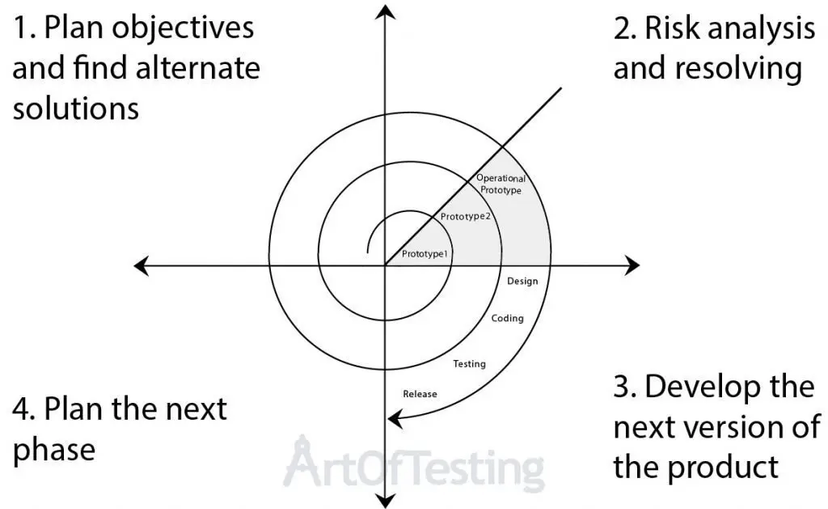
Phases of the Spiral Model:
The Spiral Model consists of four main phases, which are repeated for each spiral:
-
Planning: In the planning phase, project objectives, requirements, and constraints are defined. Potential risks are identified and analyzed, and the development strategy for the current spiral is determined.
-
Risk Analysis and Engineering: This phase involves identifying, analyzing, and mitigating risks. Detailed planning for software development, such as architecture and design, takes place. The goal is to resolve high-priority risks.
-
Development and Testing: During this phase, developers implement the software according to the plans established in the previous phases. Testing and verification activities are conducted to ensure the quality and correctness of the software.
-
Evaluation and Feedback: After the development and testing phase, the software is evaluated. User feedback, as well as the results of testing and risk analysis, inform decisions for the next spiral. The project may proceed to the next spiral or conclude if the objectives are met.
Advantages of the Spiral Model:
-
Risk Management: The focus on risk management makes the Spiral Model suitable for projects with uncertainty or evolving requirements.
-
Flexibility: The iterative nature of the model accommodates changes and allows for adaptation as the project progresses.
-
Early Prototyping: Prototypes can be developed and refined in the early stages, facilitating user involvement and feedback.
-
Quality Assurance: Regular testing and evaluation phases promote the early detection and correction of defects.
Disadvantages of the Spiral Model:
-
Complexity: Managing the iterative process, risk analysis, and multiple spirals can be complex and require significant effort.
-
Resource Intensive: The thorough analysis and risk management process can be resource-intensive, particularly for small projects.
-
May Require Experienced Team: Effective risk management and decision-making require an experienced development team.
-
Scheduling Challenges: Estimating the time and resources needed for each spiral can be challenging.
What are the different activities in project planning? What is error tracking?
- Project planning involves several key activities to ensure successful initiation, execution, and completion of a project. Here are some of the different activities in project planning:
- Scope Definition:
- Clearly define the project scope, outlining what is included and excluded from the project.
- Objective Setting:
- Establish specific, measurable, achievable, relevant, and time-bound (SMART) objectives for the project.
- Task Identification:
- Break down the project into tasks and activities to create a detailed work breakdown structure (WBS).
- Resource Planning:
- Identify and allocate resources, including human resources, materials, and equipment, needed for each task.
- Timeline Development:
- Create a project schedule, including start and end dates for each task, to track progress and manage deadlines.
- Risk Assessment:
- Identify potential risks and uncertainties associated with the project, and develop strategies for risk mitigation.
- Budgeting:
- Develop a budget that outlines the estimated costs associated with each task and the overall project.
- Quality Planning:
- Define the quality standards and procedures that will be followed to ensure the deliverables meet the specified criteria.
- Change Management:
- Establish procedures for handling changes to the project scope, schedule, or resources.
- Procurement Planning:
- Identify any external resources or services that need to be procured and develop a procurement strategy.
- Stakeholder Identification:
- Identify all project stakeholders and their interests, and plan for their involvement and communication.
- Monitoring and Control Mechanisms:
- Develop systems and tools for monitoring and controlling project progress, including key performance indicators (KPIs).
- Documentation:
- Establish documentation standards and processes for recording project-related information.
Error Tracking:
- Error tracking, also known as issue tracking or defect tracking, is a process that involves identifying, documenting, and managing errors, defects, or issues that arise during the project development or execution.
- The goal is to keep track of problems that may impact the quality, functionality, or performance of the project deliverables.
Key Components of Error Tracking:
- Identification:
- Identify and document errors as they are discovered during various project activities.
- Logging:
- Record detailed information about each error, including its nature, severity, location, and the steps to reproduce it.
- Assigning Ownership:
- Assign responsibility for addressing and resolving each error to specific team members.
- Prioritization:
- Prioritize errors based on their severity and impact on project goals and objectives.
- Resolution:
- Develop plans and strategies to resolve each identified error efficiently.
- Verification and Validation:
- Verify that the proposed resolutions effectively address the identified errors and validate the corrections.
- Reporting:
- Generate regular reports summarizing the status of error tracking and resolution efforts for project stakeholders.
Discuss the differences between black box and white box testing.
Black Box Testing vs. White Box Testing:
| Characteristic | Black Box Testing | White Box Testing |
|---|---|---|
| Definition | Focuses on the software's external functionality without considering its internal code structure. | Involves assessing the internal code structure and logic of the software. |
| Approach | Testers evaluate inputs and observe outputs without knowledge of how the software achieves those results. | Testers have access to the source code and design the test cases based on an understanding of the code's internal workings. |
| Focus | Emphasizes validating user interfaces, APIs, and overall system behavior. | Concentrates on verifying the internal algorithms, data structures, and code paths. |
| Tester's Knowledge | Tester does not need knowledge of the internal code. | Tester requires knowledge of the internal code. |
| Testing Levels | Applied at the system, integration, and acceptance testing levels. | Applied at the unit, integration, and system testing levels. |
| Test Design Techniques | Equivalence partitioning, boundary value analysis, state transition testing, and more. | Statement coverage, branch coverage, path coverage, and more. |
| Use Cases | Suitable for testing user-centric functionalities and scenarios. | Suitable for testing internal logic, code paths, and system integration. |
What is Coupling? What is Cohesion? Explain different types of Cohesion and Coupling with proper example. (Summer 7)
What is coupling? Explain the various types of coupling? (Winter 7)
What are the different types of Cohesion? (Winter 3)
What is cohesion? Explain the various types of cohesion?
- Coupling refers to the degree of interdependence between different modules or components in a software system.
- It measures how much one module relies on the functionality provided by another.
- In general, low coupling is desirable as it enhances maintainability, reusability, and flexibility in software systems.
Types of Coupling:
- Data Coupling:
- Modules are loosely coupled if they communicate by passing minimal data between them.
- Example:
- Module A sends only the necessary data to Module B without exposing its internal structure.
- Control Coupling:
- Modules are coupled if one module controls the behavior of another by providing it with specific control information.
- Example:
- Module A dictates the behavior of Module B by passing control flags or parameters.
- Common Coupling:
- Modules are coupled if they share global data.
- Example:
- Multiple modules access and modify the same global variable, leading to a high degree of interdependence.
- Stamp Coupling:
- Modules are coupled if they share a composite data structure, such as a record or array, and use only a part of it.
- Example:
- Module A uses the first half of a shared array, and Module B uses the second half.
- Content Coupling:
- Modules are tightly coupled if one module accesses the internal details or implementation of another.
- Example:
- Module A directly accesses the private variables of Module B.
Cohesion in Software Engineering:
- Cohesion refers to the degree to which the elements (functions, classes, or modules) within a software module are related to one another.
- High cohesion is desirable as it indicates that the elements within a module are closely related and work together to achieve a specific functionality.
Types of Cohesion:
- Functional Cohesion:
- Elements are grouped because they perform a similar function or operation.
- Example:
- A module containing functions for file input, file processing, and file output.
- Sequential Cohesion:
- Elements are grouped because they are executed sequentially in the same order.
- Example:
- A module with steps for initializing a system, processing data, and generating a report in a fixed sequence.
- Communicational Cohesion:
- Elements are grouped because they operate on the same input data or share intermediate results.
- Example:
- A module with functions that all operate on the same data structure.
- Procedural Cohesion:
- Elements are grouped because they contribute to a single, sequential computation.
- Example:
- A module with functions for computing a specific mathematical formula.
- Temporal Cohesion:
- Elements are grouped because they are executed at the same time.
- Example:
- A module with functions that are all executed during a specific event or time period.
- Logical Cohesion:
- Elements are grouped because they are logically related, but the specific criterion is not clearly defined.
- Example:
- A module containing a mix of functions related to data manipulation.
- Coincidental Cohesion:
- Elements are grouped arbitrarily with no clear relationship.
- Example:
- A module that contains unrelated functions for different purposes.
What is requirement engineering? State its process and explain requirements elicitation problem.
Requirement Engineering:
- Requirement Engineering is the systematic process of gathering, documenting, and managing requirements for a system or software project.
- It involves understanding user needs, defining system functionality, and establishing constraints for successful project development.
Process of Requirement Engineering:
- Requirement Elicitation:
- Gather information about the requirements from stakeholders.
- Requirement Analysis:
- Analyze and document gathered requirements.
- Requirement Specification:
- Clearly define and document the requirements in detail.
- Requirement Validation:
- Ensure that the specified requirements meet stakeholder needs.
- Requirement Management:
- Track changes, prioritize requirements, and maintain traceability.
Requirements Elicitation Problem:
- Requirements elicitation is the process of extracting information from stakeholders to understand their needs and expectations. However, it often faces challenges:
- Incomplete Information:
- Stakeholders may not provide all necessary details, leading to incomplete requirements.
- Changing Requirements:
- Stakeholder needs may evolve during the project, making it challenging to capture stable requirements.
- Varying Perspectives:
- Different stakeholders may have conflicting views, making it difficult to align requirements.
- Unclear Communication:
- Miscommunication between stakeholders and the development team can result in misunderstood requirements.
- Hidden Requirements:
- Some critical requirements may not be explicitly expressed or may be overlooked.
Explain with example diagram the functional and behavioral modeling. How do we model the software’s reaction to some external event?
Functional Modeling:
- Functional modeling involves representing what a system does, its operations, and capabilities.
- For instance, in a banking system, it would include functions like creating accounts, transferring funds, and checking balances.
Behavioral Modeling:
- Behavioral modeling focuses on how a system behaves in response to various events or conditions.
- For example, in a banking system, it would show the steps a user takes to transfer funds, including validations and system responses.
Modeling Software's Reaction to External Events:
- To model how software reacts to external events, techniques like State Transition Diagrams and Sequence Diagrams are used.
- State Transition Diagrams:
-
Represent how the software moves between different states based on external events. Each state reflects a mode of operation.
-
Example:
- In a ticket booking system, states could include "Selecting Seats" or "Entering Payment Details," and transitions occur based on events like "Payment Confirmation."
- Sequence Diagrams:
-
Illustrate interactions between objects in chronological order, depicting how the software reacts to external events over time.
-
Example:
- In an online shopping system, a sequence diagram would show how a user adds items to the cart, proceeds to checkout, and completes the purchase.
What is Software Testing? What is the role of a Software Tester? Compare Black Box and White Box Testing.
-
Software Testing is the process of evaluating a software application to ensure it behaves as expected and meets specified requirements.
-
The goal is to identify defects or bugs in the software, ensuring its quality and reliability before it is released.
Role of a Software Tester:
- Test Planning:
- Develop a comprehensive test plan outlining the testing approach and strategy.
- Test Case Design:
- Create detailed test cases that cover various scenarios to ensure thorough testing.
- Test Execution:
- Execute test cases to identify defects and verify that the software functions correctly.
- Defect Reporting:
- Report identified defects to the development team with clear information for resolution.
- Regression Testing:
- Perform regression testing to ensure that new changes do not negatively impact existing functionality.
- Collaboration:
- Collaborate with developers and other stakeholders to understand requirements and resolve issues.
- Automation:
- Implement automated testing where applicable to enhance efficiency and repeatability.
Explain the Evolutionary and Incremental Model. What are the Advantages and Disadvantages?
- The Evolutionary Model develops a basic version of the software and iteratively adds features based on user feedback and evolving requirements.
- It starts with a simple prototype, which is then refined and extended over time.
Advantages:
- Early Delivery: Provides an early version of working software for quick delivery.
- Continuous Improvement: Allows for continuous user feedback, refining and improving the system.
- Flexibility: Adaptability to changing requirements during the development process.
Disadvantages:
- System Stability: May lead to an undefined or unstable system if not managed properly.
- Estimation Challenges: Difficulty in accurately estimating time and effort for each iteration.
Incremental Model:
- The Incremental Model breaks the system into small, manageable parts, and each part is developed and delivered incrementally.
- Each increment builds on the functionality of the previous increment, with the final product integrating all increments.
Advantages:
- Early Partial Deliveries: Provides early partial deliveries of the software for testing.
- Independent Testing: Each increment is a deliverable and can be tested independently.
- System Understanding: Allows for a better understanding of the system as it is developed incrementally.
Disadvantages:
- Architectural Design: The overall system's architecture must be designed to accommodate incremental development.
- Integration Challenges: Integration issues may arise if not carefully managed.
What do you mean by system testing? Explain in detail.
- Testing the software and other system elements together.
- Increasing the scope of testing gradually in a clockwise spiral direction.
Different System Tests:
-
System Functionality and Performance:
- Verifying that all system elements mesh properly for overall system function and performance.
- Conducting recovery testing to ensure proper recovery from failures, both automatic and those requiring human intervention.
- Evaluating recovery mechanisms such as re-initialization, check pointing, data recovery, and system restart.
-
Security Testing:
- Verifying protection mechanisms against improper system penetration.
- Simulating attempts to breach system security, assuming the role of an individual attempting unauthorized access.
-
Stress and Performance Testing:
- Stress testing involves pushing the system beyond normal limits in terms of resource demands.
- Sensitivity testing is a variation of stress testing.
- Performance testing assesses run-time performance within an integrated system at various levels, from units to the complete system.
-
Deployment Testing:
- Also known as configuration testing, it ensures software operates correctly in different environments.
- Examines installation procedures, specialized installation software, and documentation for end-user introduction.
Explain Component Based software engineering in detail. (R)
Component-Based Software Engineering (CBSE):
- Component-Based Software Engineering is an approach to software development that emphasizes the construction of software systems using pre-built, independent, and interchangeable software components.
- These components can be sourced from various vendors or developed in-house, and they are assembled to create complex and robust software applications.
Key Concepts and Components:
- Components:
- Definition:
- A component is a modular, self-contained, and reusable unit of software that encapsulates a specific functionality or service.
- Characteristics:
- Independence: Components should operate independently and not be tightly coupled to other components.
- Reusability: Components are designed to be reused in different contexts or applications.
- Replaceability: Components can be replaced with newer versions without affecting the entire system.
- Encapsulation: Components hide their internal workings, exposing only the necessary interfaces.
- Interfaces:
- Components communicate with each other through well-defined interfaces, specifying how they can be used by other components.
- Component Repository:
- A repository or registry where components are stored and managed. Developers can access the repository to find suitable components for their applications.
- Standards and Protocols:
- CBSE relies on standards and protocols to ensure interoperability between components. Common standards facilitate the integration of components from different sources.
Process of Component-Based Software Engineering:
- Component Identification:
- Identify the components needed for the software system. These can be existing components or ones that need to be developed.
- Component Acquisition:
- Acquire the necessary components from a component repository, third-party vendors, or by developing them in-house.
- System Design:
- Design the overall system architecture, defining how the components will interact and be integrated into the system.
- Component Integration:
- Integrate the selected components into the system, ensuring that they work together seamlessly. This involves connecting their interfaces.
- Testing:
- Perform testing at the component level to ensure each component functions as intended. Then, conduct system-level testing to verify the interactions between components.
- Deployment:
- Deploy the software system with its assembled components.
- Maintenance and Evolution:
- As the software evolves, components may need updates or replacement. The CBSE approach makes this process more manageable.
Advantages of Component-Based Software Engineering:
- Reusability:
- Interoperability:
- Rapid Development:
- Reduced Development Costs:
- Easy Maintenance:
Challenges and Considerations:
- Compatibility Issues:
- Vendor Dependence:
- Versioning:
- Quality Assurance:
Explain Agile Development in detail.
- Agile Development is an iterative and incremental approach to software development that emphasizes flexibility, collaboration, and customer satisfaction.
- The Agile methodology is based on a set of principles outlined in the Agile Manifesto, and it provides a framework for managing and adapting to change throughout the development process.
Key Practices within Agile Development:
- Iterative Development:
- Breaking down the project into small, manageable iterations or sprints, each delivering a potentially shippable product increment.
- Continuous Feedback:
- Regularly seeking feedback from customers and stakeholders to guide development and make necessary adjustments.
- Collaborative Teams:
- Promoting close collaboration between cross-functional teams, including developers, testers, and business representatives.
- Adaptability:
- Embracing change throughout the development process to better respond to evolving requirements and priorities.
- Prioritization:
- Focusing on delivering high-priority features that provide the most value to the customer.
Key Practices and Frameworks in Agile Development:
- Scrum:
- An Agile framework that organizes work into time-boxed iterations called sprints, with regular ceremonies like sprint planning and review.
- Kanban:
- A visual management method that helps teams balance workloads and optimize their flow, making the process more efficient.
- Extreme Programming (XP):
- Emphasizes practices such as continuous integration, test-driven development, and frequent releases to enhance software quality.
- Lean Software Development:
- Adapts principles from lean manufacturing to optimize efficiency, eliminate waste, and deliver value to customers.
Benefits of Agile Development:
- Flexibility:
- Agile allows teams to adapt to changing requirements, priorities, and market conditions more easily.
- Customer Satisfaction:
- Regular customer collaboration ensures the delivered product aligns with customer expectations.
- Faster Time to Market:
- Iterative development and continuous delivery practices contribute to faster releases and quicker time-to-market.
- Improved Quality:
- Practices such as test-driven development and continuous integration contribute to higher software quality.
- Enhanced Communication:
- Agile promotes transparent communication and collaboration within cross-functional teams.
Explain DevOps life Cycle.
- DevOps is a cultural and collaborative approach that integrates software development (Dev) and IT operations (Ops), aiming to improve the efficiency and effectiveness of the software delivery process.
- The DevOps lifecycle encompasses various stages, promoting collaboration, automation, and continuous improvement.
- Here's an overview of the key stages in the DevOps lifecycle:
- Plan:
- Define and plan the development and delivery process.
- Activities:
- Prioritize features and requirements.
- Plan sprints or development cycles.
- Set goals and milestones.
- Code:
- Develop and implement the code for the planned features.
- Activities:
- Write code using best practices.
- Collaborate on code repositories (e.g., Git).
- Practice version control and branching.
- Build:
- Compile and build the code into executable binaries.
- Activities:
- Use build automation tools (e.g., Jenkins) for continuous integration.
- Run automated tests to validate the code.
- Test:
- Ensure the quality and functionality of the code through testing.
- Activities:
- Conduct unit, integration, and functional testing.
- Automated testing for quick feedback.
- Perform security and performance testing.
- Release:
- Deploy the tested code to staging or production environments.
- Activities:
- Use deployment automation tools (e.g., Ansible, Kubernetes).
- Ensure consistency between environments.
- Monitor and roll back if issues arise.
- Deploy:
- Roll out the application to end-users.
- Activities:
- Coordinate deployment activities.
- Monitor system performance and user experience.
- Implement canary releases or feature flags for controlled deployments.
- Operate:
- Monitor, manage, and maintain the application in a live environment.
- Activities:
- Monitor system performance and logs.
- Implement proactive measures for issue resolution.
- Respond to incidents and outages promptly.
- Monitor:
- Continuously monitor the application's performance and user feedback.
- Activities:
- Use monitoring tools for real-time visibility.
- Gather user feedback and performance metrics.
- Analyze data to identify areas for improvement.
What is Requirement Engineering? List the Functional and Non-Functional requirements for Blood bank Management system.
- Requirement Engineering (RE) is a systematic process of gathering, documenting, and managing requirements throughout the software development lifecycle.
- It involves understanding, analyzing, and specifying the needs and constraints of stakeholders to ensure that the final software product meets their expectations.
Functional and Non-Functional Requirements for Blood Bank Management System:
Functional Requirements:
- User Authentication:
- Users should be able to log in securely with unique credentials.
- Donor Management:
- The system should allow the registration and management of blood donors, including personal details and blood type.
- Blood Inventory Management:
- Maintain an inventory of available blood units, including tracking the quantity, type, and expiration date.
- Blood Donation Scheduling:
- Provide a feature for scheduling blood donation appointments for donors.
- Blood Request Processing:
- Allow healthcare facilities to place requests for specific blood types and quantities.
- Blood Matching Algorithm:
- Implement an algorithm to match requested blood types with available donors.
- Donor Notification:
- Notify donors of upcoming appointments, donation opportunities, and blood shortages.
- Reporting:
- Generate reports on blood inventory, donor statistics, and donation history.
- Blood Transfusion Record Keeping:
- Record and maintain a history of blood transfusions, including recipient information and outcomes.
Non-Functional Requirements:
- Security:
- Ensure data security and privacy, with restricted access to sensitive information.
- Scalability:
- The system should be scalable to handle an increasing number of donors, requests, and transactions.
- Performance:
- Response times for critical operations (e.g., matching blood types) should be within acceptable limits.
- Reliability:
- The system should be reliable, with minimal downtime and robust error handling.
- Usability:
- The user interface should be intuitive and user-friendly to accommodate users with varying levels of technical expertise.
- Compatibility:
- Ensure compatibility with different devices and browsers for widespread accessibility.
- Regulatory Compliance:
- Comply with relevant healthcare and data protection regulations.
- Audit Trail:
- Maintain an audit trail for tracking changes to sensitive data and system activities.
Write SRS For Students Result Management System.
1. Introduction
- Purpose
- The purpose of the Students Result Management System (SRMS) is to automate and streamline the process of managing and analyzing students' academic results.
- The system aims to provide a centralized platform for educational institutions to efficiently handle student data, grades, and performance analysis.
- Scope
- The SRMS will cover tasks related to result entry, result publication, student performance analysis, and reporting.
- It will be accessible to administrators, teachers, and students with different levels of access privileges.
2. System Overview
- System Description
- The Students Result Management System is a web-based application that facilitates the management and analysis of academic results.
- It includes modules for result entry, result publication, student profile management, and performance analysis.
- Key Features
- Secure user authentication and authorization.
- Result entry and editing capabilities for teachers and administrators.
- Automated result publication and notification to students.
- Student profile management, including personal details and academic history.
- Performance analysis tools for teachers and administrators.
- Reporting functionalities for generating transcripts, grade sheets, and performance reports.
3. Functional Requirements
- User Roles
-
Administrator:
- Manage user accounts and roles.
- Configure grading systems and academic terms.
- Generate reports and analytics.
-
Teacher:
- Enter and edit student results.
- View and analyze individual student performance.
- Generate class-wise performance reports.
-
Student:
- View personal academic history.
- Access published results.
- Result Entry and Editing
- Teachers and administrators should be able to:
- Enter and edit student results for different subjects and exams.
- Configure grading criteria and schemes.
- Result Publication
- Automatically publish results based on predefined schedules.
- Notify students of result availability.
- Student Profile Management
- Maintain a comprehensive profile for each student, including personal details, enrollment information, and academic history.
- Performance Analysis
- Provide teachers with tools to analyze individual student performance.
- Enable administrators to generate overall performance reports for classes and subjects.
- Reporting
- Generate transcripts, grade sheets, and other academic reports.
- Export reports in various formats (PDF, Excel).
4. Non-Functional Requirements
- Security
- Ensure secure authentication with role-based access control.
- Encrypt sensitive data, such as student personal information.
- Scalability
- The system should handle a growing number of students, classes, and user accounts.
- Usability
- Provide an intuitive and user-friendly interface for all user roles.
- Include help documentation and tooltips.
- Performance
- Maintain acceptable response times for result retrieval and analysis.
- Compatibility
- Support major web browsers (Chrome, Firefox, Safari).
5. Constraints
The development of the Students Result Management System is subject to the following constraints:
- Budget constraints for development and maintenance.
- Time constraints for project completion.
- Compliance with data protection regulations.
6. Appendices
Glossary
- SRMS: Students Result Management System
- Administrator: A user role with the highest level of access privileges.
- Teacher: A user role responsible for entering and managing student results.
- Student: A user role with limited access to personal academic information.
Explain project scheduling process and Gantt Chart in detail.
- Project scheduling in software development involves planning and allocating estimated effort across the project duration, organizing tasks, and managing resources to ensure timely completion.
- The scheduling process relies on principles and tools like the Gantt Chart, PERT, and CPM (Critical Path Method) to manage and track project progress.
Scheduling Principles:
- Compartmentalization: Breaking down the project into manageable tasks and activities.
- Interdependency: Identifying tasks that can run in parallel or those that must be completed sequentially.
- Time Allocation: Assigning start and completion dates for tasks while considering their interdependencies.
- Effort Validation: Ensuring enough resources are allocated daily to meet task deadlines.
- Defined Responsibilities: Assigning specific tasks to team members.
- Defined Outcomes: Each task should have a defined deliverable.
- Defined Milestones: Recognizing significant points where tasks or deliverables are completed.
Scheduling Methods:
-
PERT (Program Evaluation and Review Technique): It estimates task durations based on three time estimates: optimistic, pessimistic, and most likely. PERT helps determine task duration probabilities and the critical path.
-
CPM (Critical Path Method): Identifies the critical path, the longest sequence of dependent tasks determining the project's minimum duration. It focuses on task dependencies and helps in scheduling tasks accordingly.
Gantt Chart:
A Gantt Chart is a visual representation of a project schedule that displays tasks, durations, start and end dates, and task dependencies in a timeline format. It allows project managers to:
- Visualize Project Timeline: Provides a clear overview of when tasks start, end, and overlap.
- Task Dependencies: Displays task interdependencies, helping identify critical paths.
- Resource Management: Helps allocate resources efficiently by visualizing their availability and task assignments.
- Progress Tracking: Allows tracking of actual progress against planned timelines.
What is the importance of Software Quality Assurance? Explain different CMM levels.
What is the importance of SQA?(3)
Importance of Software Quality Assurance (SQA):
- Software Quality Assurance (SQA) plays a vital role in the software development process, ensuring that the final software product meets the specified quality standards.
- The importance of SQA can be highlighted through various aspects:
Importance of Software Quality Assurance (SQA):
- Early Defect Detection:
- Identifies defects early, reducing the cost and effort of fixing issues later in the development process.
- Improves Software Reliability:
- Ensures rigorous testing and quality control, contributing to the overall reliability and stability of the software.
- Customer Satisfaction:
- Meets or exceeds customer expectations, enhancing satisfaction and trust in the software product.
- Compliance with Standards:
- Ensures adherence to industry standards, regulations, and best practices, making the software more reliable and acceptable.
- Risk Management:
- Identifies and mitigates potential risks in the development process, leading to a more predictable and controlled project.
- Optimizes Development Process:
- Involves process improvement initiatives, optimizing development processes for efficiency and effectiveness.
- Cost Savings:
- Reduces overall development and maintenance costs by detecting and fixing defects early.
- Enhances Team Collaboration:
- Encourages collaboration among development, testing, and other teams, fostering a culture of quality.
What is architectural design? Enlist different style and patterns of architecture.
What is architectural design? Discuss different style and patterns of architecture. (summer-7)
- Architectural design in software engineering refers to the process of defining the structure and organization of a software system.
- It involves making high-level decisions and choices regarding the software's components, their relationships, and how they interact to achieve the desired functionality and qualities.
Architectural Styles:
- Data-Centered Architectures:
- Emphasizes the centrality of data in the architecture.
- Examples include Repository Style, Blackboard Style.
- Data Flow Architectures:
- Focuses on the flow of data between processes.
- Examples include Pipe and Filter Style, Batch Sequential Style.
- Call and Return Architectures:
- Centers around the concept of function calls and returns.
- Examples include Main Program and Subroutines Style.
- Object-Oriented Architectures:
- Organizes the software around objects representing real-world entities.
- Examples include Object-Oriented Style, Component-Based Style.
- Layered Architectures:
- Organizes the system into layers, each responsible for a specific functionality.
- Examples include OSI Model, Three-Tier Architecture.
Architectural Patterns:
- Observer Pattern:
- Defines a one-to-many dependency between objects. When one object changes state, all its dependents are notified and updated automatically.
- Singleton Pattern:
- Ensures a class has only one instance and provides a global point of access to it.
- Factory Method Pattern:
- Defines an interface for creating an object but allows subclasses to alter the type of objects that will be created.
- Adapter Pattern:
- Allows the interface of an existing class to be used as another interface.
- Decorator Pattern:
- Attaches additional responsibilities to an object dynamically.
- Decorators provide a flexible alternative to subclassing for extending functionality.
- Strategy Pattern:
- Defines a family of algorithms, encapsulates each algorithm, and makes them interchangeable.
- Clients can choose an algorithm without altering the client's code.
- Builder Pattern:
- Separates the construction of a complex object from its representation, allowing the same construction process to create various representations.
- Composite Pattern:
- Composes objects into tree structures to represent part-whole hierarchies.
- Clients can treat individual objects and compositions of objects uniformly.
What is BVA? Explain merits and demerits of BVA.
- Boundary Value Analysis (BVA) is a software testing technique that focuses on testing values at the boundaries of input domains.
- The idea is to test the system's behavior at the lower and upper limits, as well as just beyond these limits, to uncover potential defects related to boundary conditions.
Advantages of BVA:
- Easy to Use:
- BVA is simple and easy to use, making it accessible for testing.
- Cost Control:
- You can control testing costs by managing the number of test cases based on software needs.
- Works for Physical Quantities:
- BVA is effective when software functionality depends on various physical quantities.
- Identifies UI Issues:
- It is good at finding potential UI or user input problems.
- Clear Procedures:
- Procedures for determining test cases through BVA are straightforward.
- Generates Small Test Cases:
- BVA produces concise and focused test cases.
Disadvantages of BVA:
- May Miss Some Values:
- BVA may not test all potential input values, leading to uncertain results.
- Doesn't Handle Dependencies:
- It doesn't address dependencies between two inputs.
- Not for Boolean Variables:
- BVA is not suitable for testing Boolean variables.
- Limited Applicability:
- It works best with independent variables representing quantity.
Explain how breakdown structure is used in software engineering. Discuss how software project scheduling helps in timely release of a product.
- A breakdown structure in software engineering refers to the decomposition of a software project into smaller, more manageable components or tasks.
- The goal is to organize and structure the project in a hierarchical manner, allowing for better planning, management, and execution.
Usage of Breakdown Structure:
- Task Organization:
- Breaks down the project into manageable tasks for efficient organization and assignment of responsibilities.
- Resource Allocation:
- Identifies and allocates specific resources needed for each task, aiding in resource management.
- Dependency Analysis:
- Analyzes task dependencies to ensure logical sequencing and minimize inter-task dependencies.
- Estimation and Budgeting:
- Supports accurate estimation of effort, time, and resources for effective budgeting.
- Progress Monitoring:
- Provides a structured framework for monitoring task progress and identifying potential bottlenecks.
- Risk Management:
- Assists in identifying and managing risks associated with specific tasks, enabling proactive risk mitigation.
- Communication:
- Enhances team communication and stakeholder understanding through a common project structure.
- Documentation:
- Serves as a foundation for creating detailed plans, schedules, and reports.
Software Project Scheduling:
Importance in Timely Product Release:
- Time Management:
- Defines tasks, estimates durations, and establishes dependencies for effective time management.
- Resource Planning:
- Allocates resources, ensuring availability and preventing shortages.
- Task Sequencing:
- Identifies logical task sequences, preventing bottlenecks.
- Risk Mitigation:
- Anticipates and plans for potential risks, enabling timely mitigation.
- Deadline Management:
- Sets realistic deadlines, providing a clear timeline for project completion.
- Team Collaboration:
- Encourages collaboration for improved communication and issue resolution.
- Client Expectations:
- Manages client expectations with clear timelines for deliverables.
- Quality Assurance:
- Allocates sufficient time for testing, contributing to a high-quality product release.
Discuss the concept of risk assessment and risk control.
Risk Assessment:
- Risk assessment in software engineering involves identifying, analyzing, and evaluating potential risks that could impact the success of a project.
- It is a proactive process aimed at understanding uncertainties and their potential consequences.
Key Components of Risk Assessment:
- Identification:
- Identify potential risks that could affect the project. This includes technical, organizational, and external factors.
- Analysis:
- Analyze the identified risks in terms of their probability of occurrence, potential impact, and the timeframe in which they might occur.
- Prioritization:
- Prioritize risks based on their severity and likelihood, focusing on those with the highest potential impact on the project.
- Documentation:
- Document the identified risks, their analysis, and the strategies for addressing them. This documentation becomes part of the project plan.
- Continuous Monitoring:
- Continuously monitor and reassess risks throughout the project life cycle, considering changes in project scope, requirements, or external factors.
Risk Control:
- Risk control involves implementing strategies and measures to manage and mitigate identified risks.
- The goal is to minimize the probability of risks occurring and reduce their impact if they do occur.
Key Components of Risk Control:
- Risk Mitigation:
- Implement strategies to reduce the probability or impact of identified risks.
- This could involve taking preventive actions to avoid potential issues.
- Risk Transfer:
- Transfer the risk to a third party, such as through insurance or outsourcing certain aspects of the project.
- Risk Acceptance:
- Accept certain risks if their impact is deemed manageable or if the cost of mitigation outweighs the potential impact.
- Contingency Planning:
- Develop contingency plans to address risks if they materialize.
- This includes having alternative approaches or resources ready to minimize the impact.
- Regular Monitoring:
- Regularly monitor the effectiveness of risk control measures and make adjustments as needed based on the evolving project environment.
- Communication:
- Communicate risk management strategies and outcomes to stakeholders to ensure transparency and understanding.
State and explain the requirements engineering tasks in detail.
- Elicitation:
- Involves gathering requirements from stakeholders, including users, customers, and other project participants.
- The goal is to understand the needs and expectations of stakeholders, ensuring a comprehensive collection of requirements.
- Analysis:
- Examines and evaluates gathered requirements for clarity, consistency, completeness, and feasibility.
- This task aims to identify potential conflicts or ambiguities in the requirements and refine them to be suitable for implementation.
- Specification:
- Documents the refined requirements in a clear, unambiguous, and structured manner.
- Specifications serve as a reference for the development team, providing a detailed understanding of what needs to be implemented.
- Validation:
- Involves obtaining feedback from stakeholders to ensure that the specified requirements meet their expectations.
- Validates requirements against the stakeholders' needs, confirming that the documented specifications accurately reflect their desires.
- Management:
- Involves tracking changes to requirements, managing versions, and ensuring traceability.
- Effective management ensures that any changes to requirements are controlled, documented, and communicated appropriately.
- Negotiation:
- Addresses conflicts or differences in requirements among various stakeholders.
- Negotiation aims to find consensus and resolve conflicts, ensuring that requirements align with the overall project goals.
- Documentation:
- Involves maintaining comprehensive and up-to-date documentation throughout the requirements engineering process.
- Documentation serves as a valuable reference and communication tool for all project participants, fostering a shared understanding.
Explain the feasibility studies. What are the outcomes? Does it have either implicit or explicit effects on software requirement collection?
- Feasibility studies in software engineering involve a thorough analysis of a proposed project to determine its viability and practicality before committing significant resources.
- These studies assess various aspects, including technical, operational, economic, legal, and scheduling feasibility.
Key Components of Feasibility Studies:
- Technical Feasibility:
- Focus: Examines whether the proposed technology can be implemented successfully.
- Considerations: Hardware and software requirements, compatibility, and technical skills.
- Operational Feasibility:
- Focus: Assesses how well the proposed system integrates with existing processes and operations.
- Considerations: Impact on daily operations, user acceptance, and adaptability.
- Economic Feasibility:
- Focus: Evaluates the cost-effectiveness of the proposed project.
- Considerations: Development costs, operating costs, return on investment (ROI), and financial benefits.
- Legal Feasibility:
- Focus: Examines compliance with legal and regulatory requirements.
- Considerations: Intellectual property rights, data protection laws, and other legal constraints.
- Scheduling Feasibility:
- Focus: Determines if the project can be completed within the specified time frame.
- Considerations: Project milestones, deadlines, and dependencies.
Outcomes of Feasibility Studies:
- Go/No-Go Decision:
- Feasibility studies provide the basis for a go/no-go decision, helping stakeholders decide whether to proceed with the project.
- Risk Identification:
- Identify potential risks and challenges associated with the project, allowing for proactive risk management.
- Resource Planning:
- Assist in planning resources, including budget, time, and personnel, based on the identified feasibility factors.
- Project Scope Definition:
- Define and refine the project scope based on the identified technical, operational, and economic constraints.
- Stakeholder Alignment:
- Align stakeholders by communicating the outcomes of the feasibility study, ensuring a shared understanding of project constraints.
- Requirement Adjustment:
- Feasibility outcomes may lead to adjustments in software requirements, considering technical and operational constraints.
Effects on Software Requirement Collection:
-
Implicit Effects:
- Feasibility studies implicitly impact requirement collection by influencing the scope, budget, and timeline.
- Technical constraints identified may guide the selection of features and functionalities.
-
Explicit Effects:
- Explicitly, feasibility studies may lead to changes in software requirements based on economic considerations, legal constraints, or identified risks.
- Adjustments may be necessary to align with the determined feasibility factors.
What do you mean by integration testing? Explain their outcomes.
- Integration testing is a level of software testing where individual units or components are combined and tested as a group.
- The purpose is to detect issues related to the interaction between integrated components.
- The goal is to ensure that the integrated components work together as expected and that the overall system functions correctly.
Types of Integration Testing:
- Top-Down Integration Testing: Testing progresses from the top-level modules to lower-level ones. Stubs may be used for modules not yet implemented.
- Bottom-Up Integration Testing: Testing starts from the lower-level modules, and modules are gradually combined to form higher-level structures.
- Big Bang Integration Testing: All components are integrated simultaneously, and the entire system is tested.
Outcomes of Integration Testing:
- Detection of Interface Errors:
- Integration testing helps identify errors related to the communication and interaction between integrated components.
- Verification of Data Flow:
- Ensures that data flows correctly between integrated modules and that the correct data is passed.
- Validation of System Architecture:
- Validates that the overall system architecture is sound and that components interact according to the design.
- Identification of Performance Issues:
- Helps uncover performance issues arising from the integration of components, such as bottlenecks or inefficient data transfers.
- Functional Correctness:
- Verifies the functional correctness of the system when components are combined, ensuring that it meets specified requirements.
- Error Localization:
- Assists in localizing and identifying the source of errors when issues are detected during integration.
- Stability Testing:
- Assesses the stability of the system when subjected to interactions between integrated components.
- Regression Testing:
- Acts as a form of regression testing to ensure that new integrations do not introduce regressions in existing functionalities.
- Enhanced Reliability:
- Contributes to the overall reliability of the system by addressing issues related to the integration of components.
- Improved Quality Assurance:
- Enhances the quality assurance process by validating that the system functions as intended when components are combined.
How does the glass box testing method work? ( 3 MARKS )
Explain white box testing in detail with example.
- White box testing, also known as clear box testing, glass box testing, or structural testing, is a testing technique that examines the internal structure and logic of a software application.
- In white box testing, the tester has knowledge of the internal workings of the software, including code, algorithms, and data structures.
- The primary goal is to ensure the correctness of the code, uncover any hidden errors, and verify the proper execution of various paths through the application.
Why White Box Testing is Required:
- Guarantee that all independent paths within a module have been exercised at least once.
- Exercise all logical decisions on their true and false sides.
- Execute all loops at their boundaries and within their operational bounds.
- Exercise internal data structures to ensure their validity.
advantages
- Testing can be commenced at an earlier stage. One need not wait for the GUI to be available.
- Testing is more thorough, with the possibility of covering most paths.
disadvantages
- Since tests can be very complex, highly skilled resources are required, with thorough knowledge of programming and implementation.
- Test script maintenance can be a burden if the implementation changes too frequently.
- Since this method of testing it closely tied with the application being testing, tools to cater to every kind of implementation/platform may not be readily available
Examples:
- Statement Coverage:
- Objective: Ensure that each statement in the code is executed at least once during testing.
- Example: For a function with multiple if-else statements, create test cases to cover each possible branch.
- Branch Coverage:
- Objective: Verify that all branches of the code are executed during testing.
- Example: Test a function with multiple conditions to ensure that all possible branches, including true and false conditions, are covered.
What is white box testing? Why it is required? Discuss different techniques of it?
Techniques of White Box Testing:
- Unit Testing:
- Unit Testing is the testing of individual units or components of the software, such as functions, classes, or modules, to ensure that they function correctly as per the intended design.
- Integration Testing:
- Integration Testing is the testing of the interaction and integration between different units or components of the software to ensure that they work together correctly as a whole.
- System Testing:
- System Testing is the testing of the entire software system as a whole, including all its components and their interactions, to ensure that the software meets its intended requirements and functions correctly in its intended environment.
Summer
Explain the version control and change control. (4 winter)
Write short note on Version Control. (3)
How version and change are controlled within and across organizations? Explain it.
Version Control:
- Version control, also known as source control or revision control, is a system that manages changes to source code or other documents. It allows developers or teams to track modifications, collaborate efficiently, and maintain a history of changes made to a project.
Key Concepts:
- A central storage location where all versions of files and changes are stored.
- Adding new or modified files to the version control system.
- Retrieving a specific version of files from the repository for editing.
- Creating separate branches for parallel development and merging changes back into the main branch.
- Marking specific versions of the code for easier reference.
Change Control:
- Change control is a process that ensures changes to a system are systematically reviewed, approved, and implemented in a controlled manner. It helps organizations manage modifications to software, hardware, processes, or documentation.
Key Concepts:
- Individuals or teams submit change requests, detailing the proposed modifications.
- A designated change control board or team reviews change requests, assesses impact, and approves or rejects the changes.
- Approved changes are implemented following a planned and controlled process.
- Comprehensive documentation of changes, including reasons, approvals, and implementation details.
Version and Change Control across Organizations:
- Common Protocols and Standards:
- Adopting widely accepted protocols and standards for version control to enhance interoperability.
- Secure Collaboration Platforms:
- Using secure collaboration platforms that allow controlled sharing of versioned code and changes.
- Clear Documentation:
- Ensuring clear and comprehensive documentation of changes and versioning practices.
Write short note on Six Sigma standard. (3 winter)
Write short note on SIX SIGMA.
- Six Sigma is a widely used statistical quality assurance strategy in businesses, aimed at process improvement, cost reduction, and increased profitability.
- The term 'six sigma' signifies a quality standard of 3.4 defects per million occurrences, derived from six standard deviations.
- Originating at Motorola in the early 1980s, Six Sigma has three core steps:

- Define: Defining customer requirements, project goals, and deliverables.
- Measure: Evaluating the existing process and its current quality performance.
- Analyze: Analyzing defect metrics to determine root causes.
For software improvements, two additional methods are employed within Six Sigma:
- Improve: Eliminating the root causes of defects to enhance the process.
- Control: Implementing measures to prevent the reintroduction of causes of defects.
These steps are often referred to as DMAIC. Alternatively, for newly developing software, some organizations suggest the following two alternating steps:
- Design: Creating a process that avoids the root causes of defects and meets customer requirements.
- Verify: Ensuring the process avoids defects and fulfills customer needs.
These steps are sometimes referred to as DMADV.
Benefits of Six Sigma:
- Improved Quality:
- Increased Efficiency:
- Cost Reduction:
- Enhanced Customer Satisfaction:
- Data-Driven Decision-Making:
What is Software Testing? Explain Black-box and White-Box Testing in details along with examples.
Software Testing
- Software testing is a vital phase in development, systematically evaluating applications to identify and fix defects.
- Its primary goal is to ensure software meets requirements, functions correctly, and delivers a positive user experience.
- Testing, including manual and automated methods, verifies software performance and adherence to quality standards.
Explain Black-box Testing in details along with examples.
Black-Box Testing:
- Black-box testing, or behavioral testing, concentrates on the functional requirements of the software. It aims to derive sets of input conditions that fully exercise all functional requirements without requiring knowledge of the internal code.
Categories of Errors Targeted:
- Functionality Errors:
- Identifying incorrect or missing functions.
- Interface Errors:
- Detecting errors in interfaces between components.
- Data Structure Errors:
- Verifying errors in data structures or external database access.
- Behavior and Performance Errors:
- Uncovering discrepancies in expected behavior or performance.
- Initialization and Termination Errors:
- Ensuring proper initialization and termination of processes.
Applicability:
- Mainly applied to System testing and Acceptance testing.
- Integration Testing, System Testing, Acceptance Testing.
Advantages:
- Tests from a user's perspective, revealing specification discrepancies.
- Tester doesn't need programming knowledge.
- Independent testing ensures an unbiased perspective.
- Test cases designed early with complete specifications.
Disadvantages:
- Limited testing of inputs, leaving many paths untested.
- Challenging test case design without clear specifications.
- Redundant tests if done by the software designer.
- Like a soothsayer closing their eyes, black-box testing operates without delving into internal workings.
Examples:
- Equivalence Partitioning:
- Objective: Divide input data into groups and ensure that the software behaves similarly within each group.
- Example: For a login system, divide passwords into valid and invalid categories to test the system's response.
- Boundary Value Analysis:
- Objective: Test how the system behaves at the boundaries of input ranges.
- Example: For an age input field that accepts values from 18 to 60, test values at the boundaries like 18, 60, and values just outside the range.
- Random Testing:
- Objective: Input random data to uncover unexpected issues.
- Example: Input random strings, numbers, or characters into a search bar to check the system's robustness.
What is SRS? What are the key elements of it? What are the qualities of a good SRS?
- The Software Requirements Specification (SRS) is a detailed document that serves as a communication bridge between stakeholders and the development team. It articulates the functional and non-functional requirements of a software system, guiding the development process.
Key Elements:
- Introduction:
- Functional Requirements:
- Non-functional Requirements:
- System Architecture:
- External Interfaces:
- System Features:
- Data Requirements:
- Safety and Security Requirements:
- Quality Attributes:
- Constraints:
- Assumptions and Dependencies:
Qualities of a Good SRS:
- Clarity:
- Ensures clear, precise language in the SRS for shared understanding and effective communication.
- Completeness:
- Captures all requirements, preventing oversights and ensuring a comprehensive foundation for development.
- Consistency:
- Maintains cohesive information to avoid contradictions, minimizing confusion and project delays.
- Verifiability:
- Requires testable requirements, facilitating systematic testing and validation during development.
- Traceability:
- Establishes a clear link between requirements and their origin, aiding change management.
- Feasibility:
- Assesses practicality and achievability within given constraints, guiding realistic objectives.
- Unambiguity:
- Ensures each requirement has a single, clear interpretation, eliminating confusion.
- Priority:
- Assigns importance levels to guide addressing critical aspects first within project constraints.
- Modifiability:
- Allows for changes without extensive rework, supporting agile development practices.
- Stakeholder Understanding:
- Ensures the SRS is accessible to all parties, promoting collaboration and reducing misalignment risks.
Which are the major phases in the waterfall model of software development? Which phase consumes the maximum effort for developing a typical software product?(4 winter)
- The phase that consumes the maximum effort for developing a typical software product is often the Implementation phase. This is because coding and translating design specifications into actual code can be a time-consuming and complex process. It involves writing, debugging, and optimizing the code to meet the specified requirements.
Draw and explain the different phases of Waterfall Model.
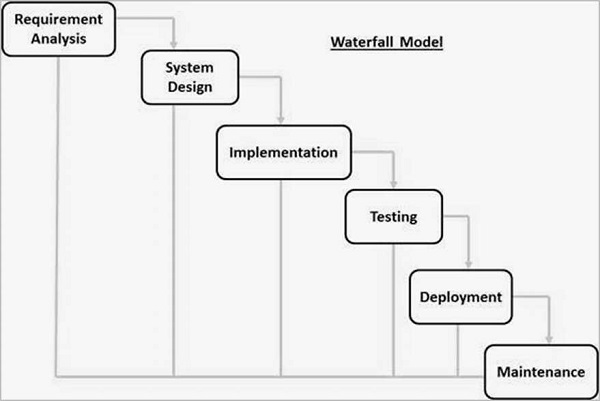
Phases:
- Requirements Gathering and Analysis:
- In this initial phase, project requirements are gathered from stakeholders and analyzed thoroughly. The goal is to establish a clear understanding of the project scope, objectives, and constraints.
- System Design:
- Once requirements are defined, the system design phase begins. It involves creating a high-level design specifying system architecture, modules, and their interactions. This phase sets the foundation for the subsequent development process.
- Implementation:
- The implementation phase involves coding based on the design specifications. Developers convert the design into actual code, creating the software product. This phase follows a sequential approach, moving from one module to the next.
- Integration and Testing:
- Modules developed in the implementation phase are integrated and tested together as a complete system. The goal is to ensure that individual components work cohesively and meet the specified requirements. Testing is comprehensive, covering various scenarios and functionalities.
- Deployment of System:
- Once the software passes testing and quality assurance, it is deployed for use. This phase involves the delivery of the software to the end-users, marking the transition from development to the operational phase.
- Maintenance:
- The maintenance phase involves addressing issues that arise after deployment. It includes bug fixes, updates, and enhancements to ensure the software's continued functionality and relevance. Maintenance can extend for an indefinite period based on the software's lifecycle.
Advantages:
- Simplicity: Simple and easy to understand with a linear structure.
- Clear Milestones: Provides clear progress markers with well-defined phases.
- Structured Approach: Enhances organization and resource allocation.
Disadvantages:
- Inflexibility: Lack of flexibility can be problematic.
- Late Feedback: Client feedback comes late, increasing the risk of misalignment.
- Limited Client Involvement: Client involvement is limited until the testing phase.
How does RAD model work? Discuss the pros and cons of RAD model.
- The RAD (Rapid Application Development) model works by emphasizing rapid prototyping and quick iterations, allowing for faster development cycles and greater flexibility in responding to changes. Here's how it typically operates:
- Business Modeling:
- Objective: Understand and document business processes, requirements, and goals.
- Process: Gather information through workshops and interviews with stakeholders. Create a model that represents the business processes and their relationships.
- Data Modeling:
- Objective: Design the data structure that the system will use.
- Process: Define data entities, their attributes, and relationships. Create a data model that serves as a blueprint for the database.
- Process Modeling:
- Objective: Create models for system processes and workflows.
- Process: Define how data moves through the system and identify interactions between different processes. Create process models that illustrate the flow of information.
- Application Generation:
- Objective: Use automated tools to quickly build the actual software applications.
- Process: Develop prototypes based on the previously defined data and process models. This phase often involves iterative cycles of development and user feedback. Automated tools and techniques are employed to expedite the coding process.
- Testing and Turnover:
- Objective: Conduct thorough testing of the system and turn it over to users for feedback.
- Process: Test the developed system comprehensively to identify and rectify any issues. Once testing is complete, deliver the system to end-users for their evaluation. User feedback is collected and incorporated into further iterations.
Advantages:
- Rapid Development:
- Quick iterations and prototyping lead to faster development cycles.
- Flexibility:
- Adaptable to changes in requirements during development.
- User Feedback:
- Continuous involvement of users ensures the system aligns with their expectations.
Disadvantages:
- Dependency on Skilled Developers:
- Requires a highly skilled and cohesive development team.
- Documentation Challenges:
- Rapid pace may result in less comprehensive documentation.
- Project Size Limitations:
- More suitable for smaller projects with well-defined requirements.
What is DevOps? How it works? What are the DevOps principles & best practices?
DevOps is a collaborative approach that combines development (Dev) and operations (Ops) to streamline software delivery. It emphasizes automation, continuous integration, and continuous delivery, fostering a culture of collaboration and efficiency.
How DevOps Works:
- Collaboration:
- Encourages teamwork between development and operations teams throughout the software development life cycle.
- Automation:
- Utilizes automation for tasks like testing, deployment, and infrastructure management to enhance efficiency and reduce errors.
- Continuous Integration (CI):
- Developers regularly integrate code changes into a shared repository, allowing for early issue detection.
- Continuous Delivery (CD):
- Maintains software in a deployable state for quick and reliable releases.
- Monitoring and Feedback:
- Constantly monitors applications and infrastructure, providing feedback to promptly address performance issues.
DevOps Principles & Best Practices:
- Culture:
- Promotes a collaborative and communicative culture, fostering shared responsibilities and goals.
- Automation:
- Automates repetitive tasks to improve efficiency and minimize errors.
- Continuous Integration (CI):
- Integrates code changes frequently for early issue detection and automated testing.
- Continuous Delivery (CD):
- Keeps software deployable for swift and reliable releases, leveraging automation.
- Infrastructure as Code (IaC):
- Manages and provisions infrastructure using code for consistency and reproducibility.
- Monitoring and Logging:
- Implements robust monitoring and logging practices for proactive issue detection and resolution.
- Collaboration and Communication:
- Encourages open communication and collaboration across teams, supported by tools like chat platforms.
- Security:
- Integrates security measures throughout the development life cycle, incorporating code scanning and vulnerability assessments.
- Scalability and Flexibility:
- Designs systems to be scalable and flexible, leveraging cloud technologies and containers.
Discuss SCRUM as agile software development process model. (R)
- Scrum is an agile software development model aligned with the Agile Manifesto's principles. It's structured around five framework activities: requirements, analysis, design, evolution, and delivery.
Key Features of Scrum:
- Sprint-based Work: Work is organized into sprints (time-boxed iterations). The number of sprints varies based on the project's complexity and size.
- Adaptability: Work within each sprint is flexible and continually modified by the Scrum team in real-time to suit the problem at hand.
- Process Patterns: Scrum employs effective software process patterns tailored for projects with changing requirements, tight deadlines, and critical business needs.
Components of Scrum:
- Backlog: Prioritized list of project requirements or features providing value to the customer. New items can be added to the backlog anytime, facilitating the introduction of changes.
- Product Manager's Role: Manages the backlog, regularly assessing and updating priorities to align with changing project needs.
Advantages of SCRUM:
- Flexibility:
- Easily adapts to changing requirements and priorities.
- Customer Satisfaction:
- Regular deliveries and feedback lead to a product that better aligns with customer expectations.
- Improved Collaboration:
- Encourages collaboration among team members and stakeholders.
- Faster Time-to-Market:
- Incremental deliveries result in quicker releases.
Disadvantages of SCRUM:
- Requires Full Commitment:
- Success depends on the commitment of all team members.
- Complex for Large Projects:
- May require scaling frameworks for larger projects and organizations.
- Not Suitable for All Projects:
- Best suited for projects with changing requirements and a need for quick deliveries.
What is the importance of user interface? Discuss user interface design rules.
Importance of User Interface (UI):
- User Interface (UI) is pivotal in shaping the interaction between users and digital information systems. It comprises visual elements facilitating user engagement with digital devices.
- The primary aim of UI design is to ensure a seamless and efficient user-device interaction. UI, coupled with User Experience (UX) design, profoundly influences the triumph of any digital product.
User Interface Design Rules:
1. Place Users in Control:
- Implement judicious use of modes (modeless).
- Allow users keyboard or mouse flexibility.
- Permit users to change focus interruptibly.
- Display helpful, descriptive messages and text.
- Provide forgiving actions with immediate and reversible feedback.
- Ensure navigable paths and exits.
- Accommodate users of varying skill levels.
- Foster a transparent user interface.
- Allow interface customization by users.
- Enable direct manipulation of interface objects.
2. Reduce Users’ Memory Load:
- Alleviate short-term memory strain.
- Rely on recognition over recall.
- Incorporate visual cues for information.
- Provide defaults, undo, and redo options.
- Implement interface shortcuts for frequent actions.
- Adopt an object-action syntax for intuitiveness.
- Utilize real-world metaphors for user understanding.
- Employ progressive disclosure of information.
- Promote visual clarity through organized design.
3. Make the Interface Consistent:
- Sustain the context of users’ tasks for continuity.
- Maintain consistency within and across products.
- Keep interaction results consistent.
- Prioritize aesthetic appeal and integrity.
- Encourage exploration within a predictable framework.
Explain the SQA activities(winter 4)
What is the importance of SQA? Discuss SQA activities.
Importance of Software Quality Assurance (SQA):
- Software Quality Assurance (SQA) is vital in enhancing software development processes' effectiveness and reliability.
- It identifies and mitigates risks, improves development practices, and ensures the delivered software meets customer expectations.
- By emphasizing quality control and continuous improvement, SQA contributes to customer satisfaction, cost reduction, and overall project success.
SQA Activities::
- SQA Plan Development:
- Develop a comprehensive SQA plan during project planning, undergoing stakeholder review.
- Govern quality assurance actions, ensuring collaboration between the software engineering team and the SQA group.
- Outline evaluations, audits, applicable standards, error reporting procedures, work products, and feedback mechanisms.
- Participation in Process Definition:
- Collaborate in defining the software process, with the software team selecting an appropriate process.
- Review the process description for adherence to organizational policies, internal standards, and external requirements.
- Review of Software Engineering Activities:
- Verify compliance with the defined software process, identifying, documenting, and tracking any deviations.
- Confirm that corrections have been implemented to address identified deviations.
- Audit of Software Work Products:
- Conduct audits on designated software work products to ensure compliance with defined processes.
- Document and track deviations, verifying the implementation of corrections. Periodically report audit results to the project manager.
- Deviations Handling:
- Document and manage deviations in software work and work products based on established procedures.
- Track noncompliance issues until resolution, maintaining records of corrective actions taken.
- Reporting to Senior Management:
- Report instances of noncompliance to senior management and provide periodic insights into SQA findings.
- Track and communicate the status of noncompliance items until their resolution.
What is the importance of class model? Prepare the class model for a web- based order-processing system for a computer store.
Importance of Class Model:
- The class model is crucial in software engineering for organizing and abstracting complex systems.
- It serves as a blueprint for implementation, aiding effective communication and collaboration among development teams.
- Additionally, it provides a foundational structure for ongoing development, ensuring consistency and facilitating maintenance and scalability.
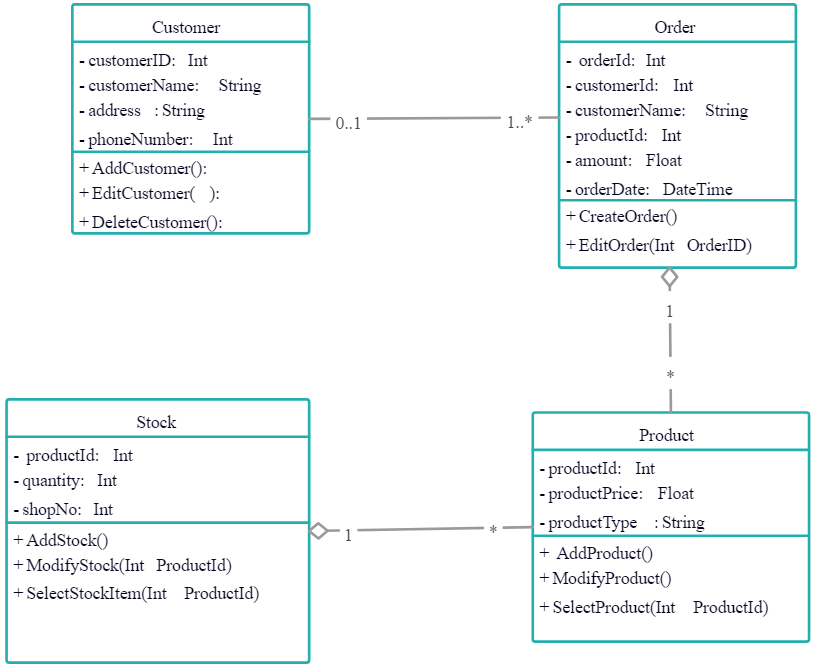
Write a short note on: (1) Function-Oriented Design (2) User Interface Design
Function-Oriented Design:
- Function-oriented design is a software design approach that focuses on decomposing a system into smaller functional modules or components.
- Each module is designed to perform a specific function or task, and the emphasis is on defining the relationships and interactions between these functions.
Key Characteristics:
- The system is decomposed into smaller, manageable functions or modules.
- Each module encapsulates a specific functionality, promoting modularity and ease of maintenance.
- Design starts with an overall view of the system and progressively breaks it down into smaller, more detailed mdules.
- DFDs are commonly used to represent the flow of data between different functions and modules.
Advantages:
- Clear modularization simplifies maintenance and updates.
- Well-suited for algorithmic or computation-intensive systems.
- Facilitates systematic top-down development. Disadvantages:
- May not align well with user perspectives or usability concerns.
- Changes in one module may have cascading effects on others.
User Interface Design:
- User Interface (UI) design focuses on creating effective, visually appealing, and user-friendly interfaces for software applications.
- It involves designing the layout, interactions, and visual elements that users interact with to accomplish tasks within the software.
Key Principles:
- Design revolves around the needs, preferences, and expectations of the end-users.
- Maintain consistency in layout, navigation, and visual elements to enhance user understanding.
- Provide immediate feedback to user actions and ensure responsive interactions.
- Keep interfaces simple, intuitive, and visually clear to minimize user confusion.
- Design interfaces that are accessible to users with diverse abilities and needs.
Advantages:
- Enhances user satisfaction and usability.
- Reduces the learning curve for new users.
- Improves efficiency and task completion rates.
Disadvantages:
- Subjective nature of design preferences may lead to varied opinions.
- Continuous changes in user preferences and technology trends may require frequent updates.
How organization can get ISO 9000 certification? Explain the process.
- Achieving ISO 9000 certification involves a systematic approach to quality management within an organization.
- The ISO 9000 family of standards focuses on quality management systems (QMS) and is designed to help organizations meet customer expectations and enhance overall satisfaction. The certification process typically involves the following steps:
-
Initiate Process:
- ISO 9000 Understanding: Familiarize key personnel with ISO 9000 standards.
- Leadership Commitment: Ensure top management commits to the quality management system.
-
Perform Gap Analysis:
- Assess Current Processes: Evaluate existing processes against ISO 9000 standards.
- Identify Improvements: Determine areas where enhancements are needed.
-
Develop Quality Management System:
- QMS Documentation: Develop required policies, procedures, and records.
- Implement Processes: Put in place processes to address gaps and enhance quality.
-
Training and Awareness:
- Employee Training: Provide ISO 9000 training for employees.
- Create Awareness: Ensure all employees understand their roles in maintaining quality.
-
Internal Audits:
- Conduct Audits: Regularly audit processes for ISO 9000 compliance.
- Corrective Actions: Address non-conformities identified during internal audits.
-
Management Review:
- Regular Reviews: Conduct management reviews of the QMS.
- Continuous Improvement: Identify opportunities for improvement.
-
Pre-Assessment (Optional):
- Mock Audit: Conduct a pre-assessment to identify weaknesses.
- Improve Weaknesses: Use findings to improve processes.
-
Select Certification Body:
- Choose Accredited Body: Select an accredited certification body.
- Understand Requirements: Understand the certification body's specific requirements.
-
External Certification Audit:
- Stage 1 Audit (Documentation Review): Certification body reviews documentation.
- Stage 2 Audit (On-Site Evaluation): On-site audit to verify QMS implementation.
-
Certification Decision:
- Certification Approval: If compliant, certification is granted.
- Certificate Issued: Organization receives ISO 9000 certificate.
-
Continuous Improvement:
- Post-Certification Monitoring: Continuously monitor and improve the QMS.
- Address Non-Conformities: Address non-conformities identified during surveillance audits.
Explain 7Cs of DevOps lifecycle.
- The 7Cs of the DevOps lifecycle represent key principles and practices that guide the development and operational processes in a DevOps environment.
- These Cs emphasize collaboration, communication, and automation to achieve faster and more reliable software delivery. Here are the 7Cs of the DevOps lifecycle:
- Collaboration:
- Definition: Foster a collaborative culture that encourages communication and teamwork between development, operations, and other stakeholders.
- Importance: Break down silos, share knowledge, and promote a collective responsibility for the entire software delivery process.
- Continuous Integration:
- Definition: Integrate code changes frequently and automatically, ensuring that the software is continuously validated and tested.
- Importance: Detect and address integration issues early, leading to higher code quality and more reliable builds.
- Continuous Delivery:
- Definition: Automate the process of deploying code changes to production or staging environments, allowing for rapid and frequent releases.
- Importance: Minimize manual interventions, reduce deployment time, and enhance the overall efficiency of the release pipeline.
- Continuous Testing:
- Definition: Integrate testing into every stage of the development pipeline, automating test execution to ensure that code changes meet quality standards.
- Importance: Identify and address issues early in the development process, improving the reliability and stability of the software.
- Continuous Deployment:
- Definition: Automate the deployment of code changes directly into production after successful testing, eliminating manual intervention.
- Importance: Accelerate the delivery pipeline, reduce the time to market, and enhance the overall agility of the development process.
- Continuous Monitoring:
- Definition: Implement real-time monitoring and feedback mechanisms to track the performance and health of applications and infrastructure.
- Importance: Detect and respond to issues promptly, ensuring optimal system performance, reliability, and user experience.
- Continuous Feedback:
- Definition: Establish feedback loops throughout the development and operations processes to gather insights from users, stakeholders, and monitoring tools.
- Importance: Use feedback to drive continuous improvement, address issues proactively, and align development efforts with business objectives.
Discuss 7 C’s of DevOps Lifecycle for Business Agility. (summer 7)
Discuss 7 C’s of DevOps Lifecycle for Business Agility.
- The 7Cs of DevOps, as outlined in your book, focus on continuous practices that contribute to the efficiency and agility of the software development lifecycle. Let's briefly discuss each of the 7Cs:
- Continuous Business Planning:
- Definition: Identifying skills, resources, and desired outcomes during the planning phase.
- Business Agility Impact: Enables organizations to align development efforts with strategic goals, fostering adaptability.
- Continuous Development:
- Definition: Preparation of development plans and identification of programming techniques.
- Business Agility Impact: Accelerates development by breaking down traditional silos, allowing for quicker code integration.
- Continuous Integration:
- Definition: Quickly integrating newly developed code with the main body of code to be released.
- Business Agility Impact: Saves time, ensures code reliability, and facilitates faster release cycles through automated integration and testing.
- Continuous Deployment:
- Definition: Deploying code into production without human intervention, with automated testing before wider release.
- Business Agility Impact: Accelerates deployment, minimizes errors, and allows for incremental releases with automated feedback loops.
- Continuous Testing:
- Definition: Executing automated test cases as part of the software delivery pipeline for immediate feedback.
- Business Agility Impact: Identifies and addresses risks early, enhancing the overall quality of the software release.
- Continuous Delivery and Monitoring:
- Definition: Building, testing, and pushing every code change to non-production environments with continuous monitoring for performance and security.
- Business Agility Impact: Ensures reliability, identifies issues promptly, and provides a streamlined process for moving code through different testing stages.
- Continuous Feedback:
- Definition: Obtaining immediate customer feedback on product features to make modifications accordingly.
- Business Agility Impact: Promotes customer-centric development, allowing quick adjustments based on real-time feedback.
Explain Computer-Aided Software Engineering in detail.
-
Computer-Aided Software Engineering (CASE) tools play a pivotal role in supporting software engineering activities throughout the software development process.
-
They automate project management tasks, handle work products, and assist engineers in analysis, design, coding, and testing. Here's an overview of CASE and its building blocks:
-
Definition: CASE tools assist software engineering practitioners and managers in various software process activities.
-
Functions: Automate project management, manage work products, and aid engineers in analysis, design, coding, and testing.
-
Integration: CASE tools can be integrated into a sophisticated environment, offering automation and improved engineering insight.
CASE Tools Building Blocks:
- Environment Architecture: Includes the hardware platform, system support (networking software, database management, object management services), forming the foundation for CASE.
- Portability Services: Bridge between CASE tools, integration framework, and environment architecture, facilitating migration across different hardware platforms and operating systems.
- Integration Framework: Collection of specialized programs enabling communication between individual CASE tools, creation of a project database, and providing a consistent user experience.
- Comprehensive Foundation: Represents a set of building blocks for the integration of CASE tools, supporting communication and consistency across various tools and activities.
- Reality of CASE Tools: Many existing CASE tools may function as "point solutions," serving a specific software engineering activity without direct communication with other tools or integration into a comprehensive CASE environment (I-CASE).
- Effectiveness of Point Solutions: Despite not being part of an integrated environment, a CASE tool can be effectively used to support specific software engineering tasks.
Challenges and Reality:
- Ideal vs. Reality: While the ideal scenario involves comprehensive integration using all building blocks, many existing CASE tools may function as standalone or point solutions.
- Point Solutions Effectiveness: Even as point solutions, CASE tools can effectively contribute to specific software engineering activities, offering valuable support.
Enlist and explain phases of agile development methodology.
- Agile development methodology is characterized by its iterative and incremental approach to software development, emphasizing flexibility and customer collaboration.
- The methodology comprises several phases that collectively form an iterative cycle. Here are the key phases of Agile development:
- Planning:
- Objective: Define project scope, goals, and deliverabs. Create a prioritized backlog of features.
- Activities:
- Conduct initial project meetings.
- Develop a product backlog.
- Prioritize backlog items.
- Create release plans.
- Iteration (Sprint) Planning:
- Objective: Plan the work for the upcoming iteration (sprint).
- Activities:
- Select user stories from the backlog.
- Define tasks for the selected stories.
- Estimate time and effort for each task.
- Commit to delivering a set of tasks in the iteration.
- Execution (Sprint):
- Objective: Develop, test, and deliver a potentially shippable product increment.
- Activities:
- Daily stand-up meetings for progress updates.
- Collaborative development and testing.
- Continuous integration of code.
- Frequent communication and collaboration among team members.
- Review (Sprint Review/Retrospective):
- Objective: Evaluate the completed iteration and identify areas for improvement.
- Activities:
- Demonstrate the completed features to stakeholders.
- Collect feedback.
- Discuss what went well and areas for improvement.
- Adjust processes and practices for the next iteration.
- Backlog Refinement (Grooming):
- Objective: Review and refine the product backlog based on feedback and changing priorities.
- Activities:
- Add, modify, or remove backlog items.
- Prioritize and estimate backlog items.
- Ensure backlog alignment with project goals.
- Release:
- Objective: Deliver the final product or a significant release to users.
- Activities:
- Integrate and test all completed features.
- Conduct final acceptance testing.
- Deploy the release to production.
- Gather user feedback.
Explain different project size estimation techniques.
- Estimating the size of a software project is a crucial aspect of project planning and management.
- Various techniques are employed to estimate project size, considering factors such as lines of code, function points, and more.
- Here are different project size estimation techniques:
- Lines of Code (LOC):
- Measures the size of a project based on the number of lines of code written.
- Pros:
- Simple and easy to understand.
- Provides a tangible measure of code volume.
- Cons:
- Ignores differences in programming languages and coding styles.
- Doesn't consider the complexity of code.
- Function Points (FP):
- Measures the functionality provided by a system, considering input, output, inquiries, files, and interfaces.
- Pros:
- Focuses on the user's perspective and functionality.
- Allows for better comparison across different projects.
- Cons:
- Requires detailed knowledge of the system's functionalities.
- Can be subjective and may vary based on the assessor.
- Use Case Points (UCP):
- Similar to function points but specifically tied to use cases, considering actors and use cases.
- Pros:
- Ties directly to user interactions and system behaviors.
- Allows for a more fine-grained estimation.
- Cons:
- Requires a thorough understanding of use cases.
- May not cover all aspects of a system's functionality.
- Story Points (Agile):
- Used in Agile methodologies, it estimates the relative effort required to implement user stories.
- Pros:
- Emphasizes collaboration and discussion among team members.
- Adaptable to changing project requirements.
- Cons:
- Subjective and depends on team consensus.
- May lack precision compared to other techniques.
- COCOMO (Constructive Cost Model):
- Employs mathematical formulas to estimate effort, time, and personnel required for a project.
- Pros:
- Provides a comprehensive estimation framework.
- Considers different project characteristics.
- Cons:
- May require historical data for accurate predictions.
- Complexity may limit its use in smaller projects.
- Expert Judgment:
- Involves seeking input from experts in the field to estimate project size based on their experience and knowledge.
- Pros:
- Quick and applicable when other data is limited.
- Leverages expertise and domain knowledge.
- Cons:
- Subjective and may vary between experts.
- Highly dependent on the quality of expert judgment.
What do you understand by performance testing? What are the different types of performance testing?
- Performance testing is a type of software testing that evaluates the speed, responsiveness, stability, and scalability of a system under different conditions.
- The goal is to identify and address performance bottlenecks, ensuring optimal functionality and user experience.
Types of Performance Testing:
- Load Testing:
- Purpose: Assess the system's ability to handle a specific load or concurrent user activity.
- Key Metrics: Response time, throughput, resource utilization.
- Example: Simulating a large number of simultaneous users accessing a web application.
- Stress Testing:
- Purpose: Evaluate the system's behavior under extreme conditions beyond normal capacity.
- Key Metrics: System stability, error handling under stress.
- Example: Applying a workload that exceeds the system's specified capacity limits.
- Volume Testing:
- Purpose: Assess the system's performance with a large volume of data.
- Key Metrics: Database response time, data storage capacity.
- Example: Testing a database system with a substantial increase in data volume.
- Scalability Testing:
- Purpose: Measure the system's ability to scale up or down in response to changing demands.
- Key Metrics: Performance as the user or data load increases or decreases.
- Example: Assessing how well a web application scales with an increasing number of users.
- Endurance Testing:
- Purpose: Evaluate system performance over an extended period under normal load conditions.
- Key Metrics: Memory leaks, resource utilization over time.
- Example: Running a system continuously for an extended duration to identify potential performance degradation.
- Concurrency Testing:
- Purpose: Assess how well a system handles multiple simultaneous users or transactions.
- Key Metrics: Response time under concurrent user activity.
- Example: Simultaneously accessing and performing transactions in an e-commerce system.
Which are the important characteristics for having good software design?
Good software design exhibits several essential characteristics:
- Modularity:
- Breaking down the system into manageable and independent modules or components, promoting ease of maintenance and modification.
- Abstraction:
- Hiding unnecessary implementation details, focusing on essential functionalities to simplify complexity and improve understanding.
- Encapsulation:
- Bundling data and methods within a class, allowing controlled access and protecting the internal workings of components.
- Reusability:
- Designing components or modules that can be utilized across different parts of the system or even in other projects, enhancing efficiency and reducing redundancy.
- Scalability:
- The design's ability to accommodate growing demands, enabling the system to handle increased data, users, or functionalities.
- Maintainability:
- Ease of making modifications or updates to the system without disrupting its overall functionality, facilitating long-term sustainability.
- Readability and Understandability:
- Clarity in design, making it easy for developers to comprehend and work on the system, reducing errors and improving collaboration.
- Performance:
- Optimizing design to ensure efficient resource utilization, minimizing processing time, and maximizing system responsiveness.
- Flexibility:
- The design's capacity to adapt to changing requirements or incorporate new features without extensive rework or structural changes.
- Testability:
- Design that allows for easy and comprehensive testing, enabling the identification and rectification of issues or bugs early in the development cycle.
What is web engineering? Explain any three web engineering methods.
- Web engineering is a branch of software engineering that focuses on the systematic development, deployment, and maintenance of web applications.
- It encompasses a set of principles, methodologies, and techniques tailored to address the unique challenges of building scalable, secure, and user-friendly web-based systems.
- Web engineering involves the entire life cycle of web application development, from requirements analysis to design, implementation, testing, deployment, and ongoing maintenance.
- Model-View-Controller (MVC):
- MVC is a design pattern that separates an application into three interconnected components: Model (data logic), View (user interface), and Controller (user input handling).
- Benefits:
- Enhances maintainability, allows parallel development of components, and enables better code organization and reusability.
- Agile Methodology:
- Agile is an iterative and flexible approach, involving incremental development, frequent collaboration between cross-functional teams, and customer involvement throughout the development process.
- Benefits:
- Facilitates adaptability to changing requirements, encourages customer feedback, improves team collaboration, and allows for quicker releases of functional increments.
- Component-Based Development (CBD):
- CBD involves constructing software systems using pre-built, reusable software components or modules. These components encapsulate specific functionalities and can be assembled to create larger applications.
- Benefits:
- Promotes reusability, reduces development time, enhances maintainability, and allows for easier scalability and customization.
Explain the design concepts Modularity and Functional Independence in detail.
Modularity in Software Design:
- Modularity is a fundamental design concept that involves breaking down complex systems into smaller, independent modules. Each module encapsulates specific functionalities and interacts with others through well-defined interfaces. The aim is to enhance maintainability, reusability, and system comprehensibility.
Key Aspects of Modularity:
- Encapsulation:
- Modules encapsulate internal details, promoting information hiding and exposing only necessary interfaces.
- Reusability:
- Well-designed modules allow for easy reuse in different parts of the system or other projects.
- Maintainability:
- Changes to one module do not affect others, simplifying localized maintenance efforts.
- Scalability:
- The system can be scaled by adding or modifying modules independently, facilitating overall system growth.
- Understanding:
- Modularity enhances system comprehensibility by providing a structured and organized design.
- Parallel Development:
- Different teams can concurrently work on different modules, speeding up the development process.
Functional Independence in Software Design:
- Functional independence is a design principle emphasizing the separation of concerns and responsibilities among system modules. It ensures that each module has a distinct purpose, and its functionalities are independent of other modules, contributing to a clear and comprehensible design.
Key Aspects of Functional Independence:
- Clear Separation of Concerns:
- Modules address distinct concerns or perform specific functions.
- Loose Coupling:
- Modules interact through well-defined interfaces with minimal dependencies, reducing the impact of changes.
- High Cohesion:
- Modules exhibit high cohesion, with internal elements contributing to a single, well-defined functionality.
- Easy Replacement and Maintenance:
- Functional independence allows easy module replacement and localized maintenance efforts.
- Isolation of Concerns:
- Concerns are isolated within modules, making it easier to understand, reason about, and modify specific parts.
- Encourages Modular Design:
- Emphasizing functional independence encourages the creation of modular designs with isolated tasks.
What are the elements of a behavioral model? Prepare use case diagram and sequence diagrams for ATM system of a bank.
Elements of a Behavioral Model:
A behavioral model in software engineering delineates how a system responds to stimuli. Key components of a behavioral model include:
- Use Case Diagrams:
- Depict interactions between actors (external entities) and the system.
- Illustrate various use cases, actors, and their relationships.
- Showcase the functionality provided by the system to users.
- Sequence Diagrams:
- Illustrate interactions between different components or objects over time.
- Present the sequence of messages exchanged between objects or actors.
- Visualize the flow of control within a specific scenario.
- State Diagrams:
- Showcase the different states a system or object can be in and transitions between states.
- Represent how an object responds to events and changes its state accordingly.
- Activity Diagrams:
- Model the flow of activities within a system.
- Represent processes and the flow of control between different activities.
- Collaboration Diagrams:
- Visualize interactions and relationships between objects.
- Focus on the structure of objects and how they collaborate to achieve specific tasks.
- Communication Diagrams:
- Similar to collaboration diagrams, illustrating interactions between objects.
- Emphasize relationships and interactions among objects in a more simplified manner.
Use Case Diagram:
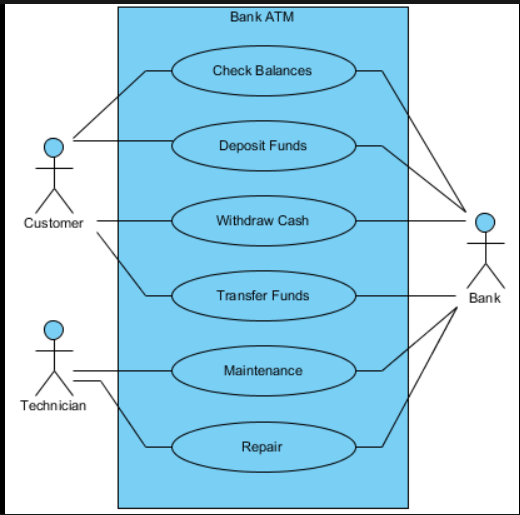
Sequence Diagram: